Thai · With spaces between words, and Paiboon+ or IPA
The best AI apps to practice speaking Thai
Updated November 15, 2026. We checked every other app on its own website, help pages and app store page. See the sources.
We built Teacher AI, so of course we’re biased. That’s why we link every claim we make about another app, and tell you plainly when another app suits you better.
มี ค่ะ ฉัน มี สอง แมว แมว สอง ตัวYes, I have two cats.
1 small fixWhy?
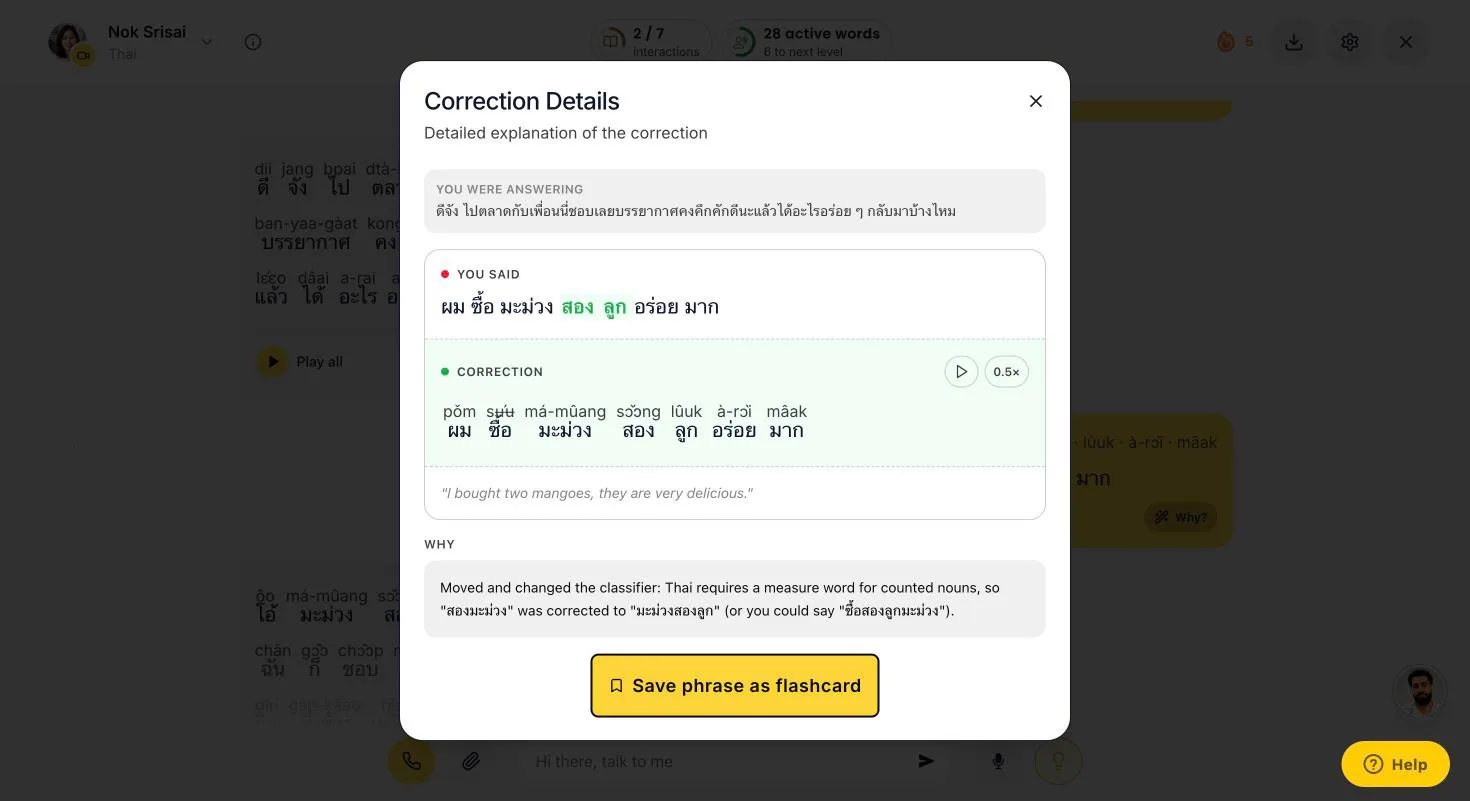
Why?Thai counts with a classifier, after the noun: noun, number, classifier. Animals take ตัว (dtua). So: แมวสองตัว (mɛɛo sɔ̌ɔng dtua), two cats.
An illustration of the conversation screen, rebuilt for this page with Thai text.
The short answer
Here’s the short version: most big AI speaking apps don’t teach Thai. Speak, Langua, Praktika and Duolingo don’t offer it to English speakers.
For getting fluent, Teacher AI is the strongest option we found. You talk about anything, for as long as you like, and every mistake gets fixed with a Why?. We put spaces between the words and write the pronunciation above each one, in Paiboon+ or IPA. And it’s more than a speaking app: you grow your Thai with videos and stories at your level, and we track every word you learn.
Starting from zero? Teacher AI works best for Thai from about A2, so learn the basics with Ling first: it’s built around Thai. And Talkpal is the other app we found with open AI conversation in Thai.
Best for getting fluent: input, speaking and trackingTeacher AITalk about anything, corrected as you go, with spaces between words and Paiboon+ or IPA above every word. Plus Thai videos and stories at your level, and your active and passive words tracked. Web, iPhone and Android, $149 a year.
Cheaper, with open AI chatTalkpalThai is one of its 130+ languages, with chat, calls and roleplays, and a romanization option. $119.99 a year, or 10 minutes a day for free. Its pages don’t say if its pronunciation score covers Thai.
Best step-by-step Thai courseLingThai is its flagship: 200+ lessons, a Script tab for the alphabet, and speech recognition aimed at the five tones. Its dialogues are mostly scripted. $89.99 a year.
A fluency system, built by polyglots
Teacher AI isn’t a chatbot with a language menu. It’s a fluency system, built by some of the most accomplished polyglots and language teachers around. People who learned many languages themselves, and know what actually gets you speaking.
Arieh Smith
Xiaoma · the world’s most viral polyglot
Lucas Bighetti
One of the world’s best polyglots · speaks 20+ languages
Olly Richards
Author · 2M+ books sold · StoryLearning founder
Jan van der Aa
Runs the leading network for online language entrepreneurs
“I’ve tried lots of this type of app. This is the best one. It feels like it’s created by someone who understands language learning.”
Jcalebmi, App Store review, October 2026
What you need to practice speaking Thai
Thai takes work. In our ranking of 67 languages it’s the 23rd hardest for English speakers, at 6,184 effort points. That’s about twice what Spanish takes.
And it needs a few things most apps were never built for.
A script you can readThai has its own alphabet, and words run together with no spaces between them. Until you can read it, you want spaces between the words and the pronunciation above each one: ผม is pǒm.
Tones you can hearThai has five tones, and a different tone is a different word: ใกล้ (glâi) is near, ไกล (glai) is far. The quickest fix: say your sentence, then hear a native speaker say the same one.
ClassifiersTo count things, Thai puts a little word after the number: มะม่วงสองลูก, two mangoes, is literally “mango two round-thing”. Everyone gets these wrong at first, so you want them fixed while you talk.
Polite endingsPolite Thai ends sentences with ครับ (kráp) if you’re a man, or ค่ะ (kâ) if you’re a woman. You learn them fastest by hearing them in every conversation.
Lots of Thai you understandSpeaking activates the words you have. New words come from input: Thai videos and texts where you already understand most of it.
Lots of speaking timeA language this hard takes hours of talking. A few minutes a day won’t get you there.
A complete fluency system, not just a speaking app
Our speaking practice is the heart of Teacher AI. But speaking alone won’t make you fluent, and neither will input alone. You need both, and you need to see it working.
So Teacher AI is a complete fluency system. Input grows your Thai. Speaking activates it. And we track every word along the way, to get you to real fluency as fast as we can.
Step 1Input grows your vocabularyWatch Thai YouTube videos and read stories at your level, with spaces between the words and Paiboon above each one. You always see how much you already understand, and every word you tap becomes a flashcard. How Watch and Read work.
Step 2Speaking activates itUnderstanding a word isn’t the same as using it, with the right tone and the right classifier. Talking with your teacher, for as long as you like, is how words move from “I know that one” to “I just said it”. Every mistake gets fixed, with a Why?.
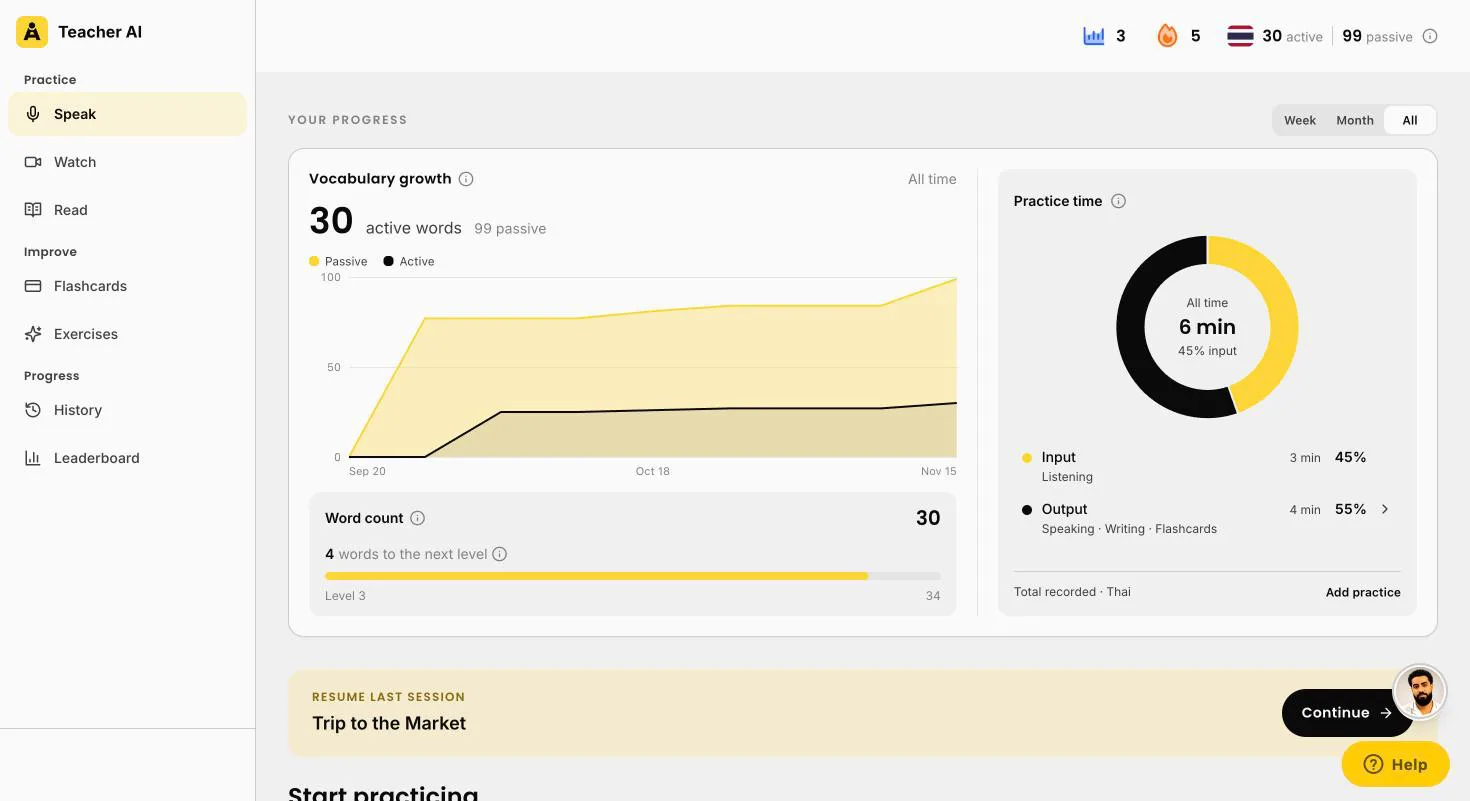
Step 3We track every wordYour passive words are the ones you understand when you read or hear them. Your active words are the ones you’ve used yourself. You see both grow, how your time splits between input and output, and how many words to your next level.
Brand new to Thai? Start somewhere else first. Teacher AI works best from about A2, once you can handle simple everyday sentences. Before that, you just don’t have enough words yet for open conversation. So learn the basics with a course like Ling or Pimsleur, and come back when you want to talk.
Your progress, in wordsYour active and passive words over time, the words to your next level, and your practice time split into input (listening, reading, watching) and output (speaking, writing, flashcards).
What it looks like in Thai
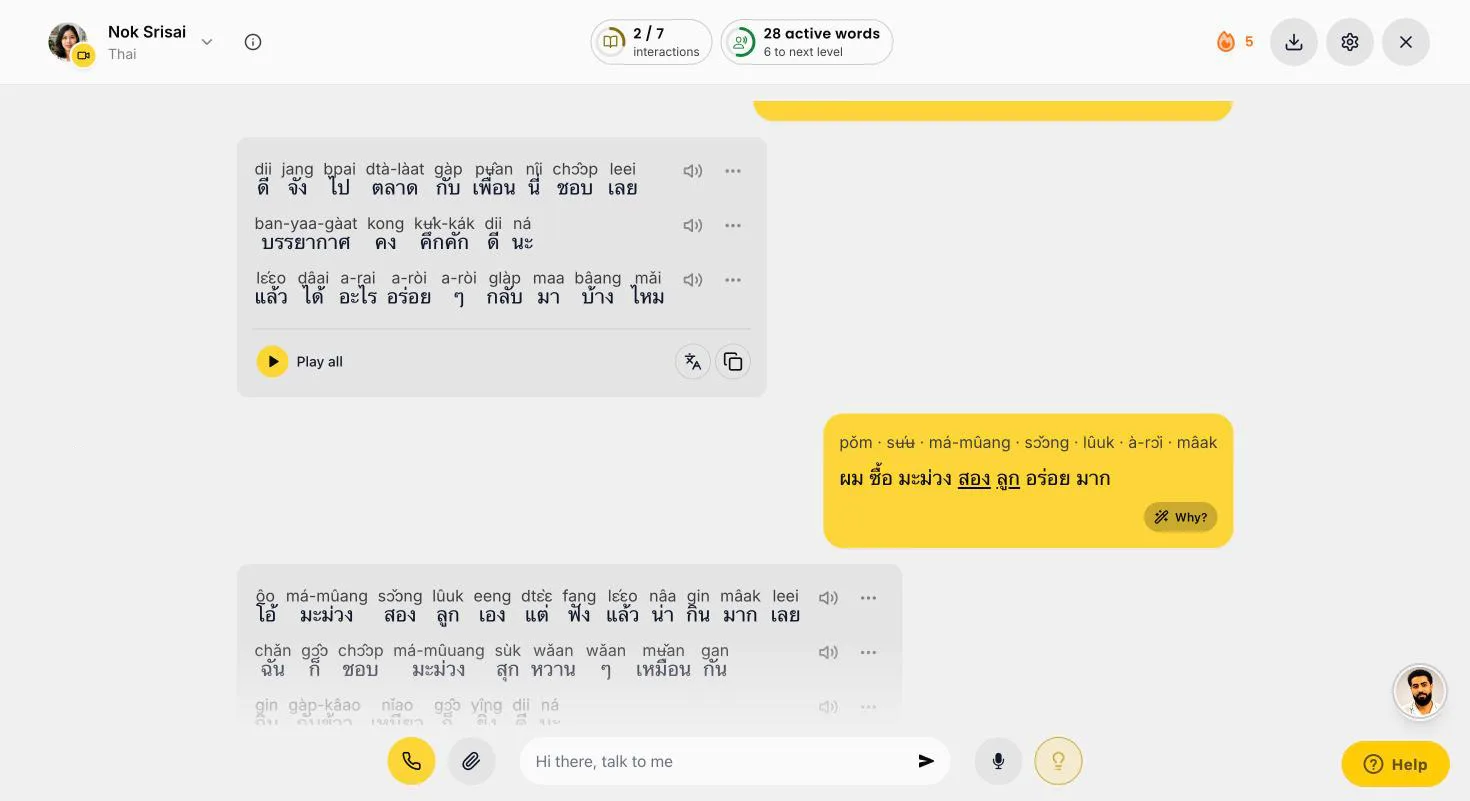
Here’s what a moment of practice looks like. You answer, your teacher replies with the pronunciation above every word, and if you made a mistake, your sentence gets fixed right there.
A card for every word you tap
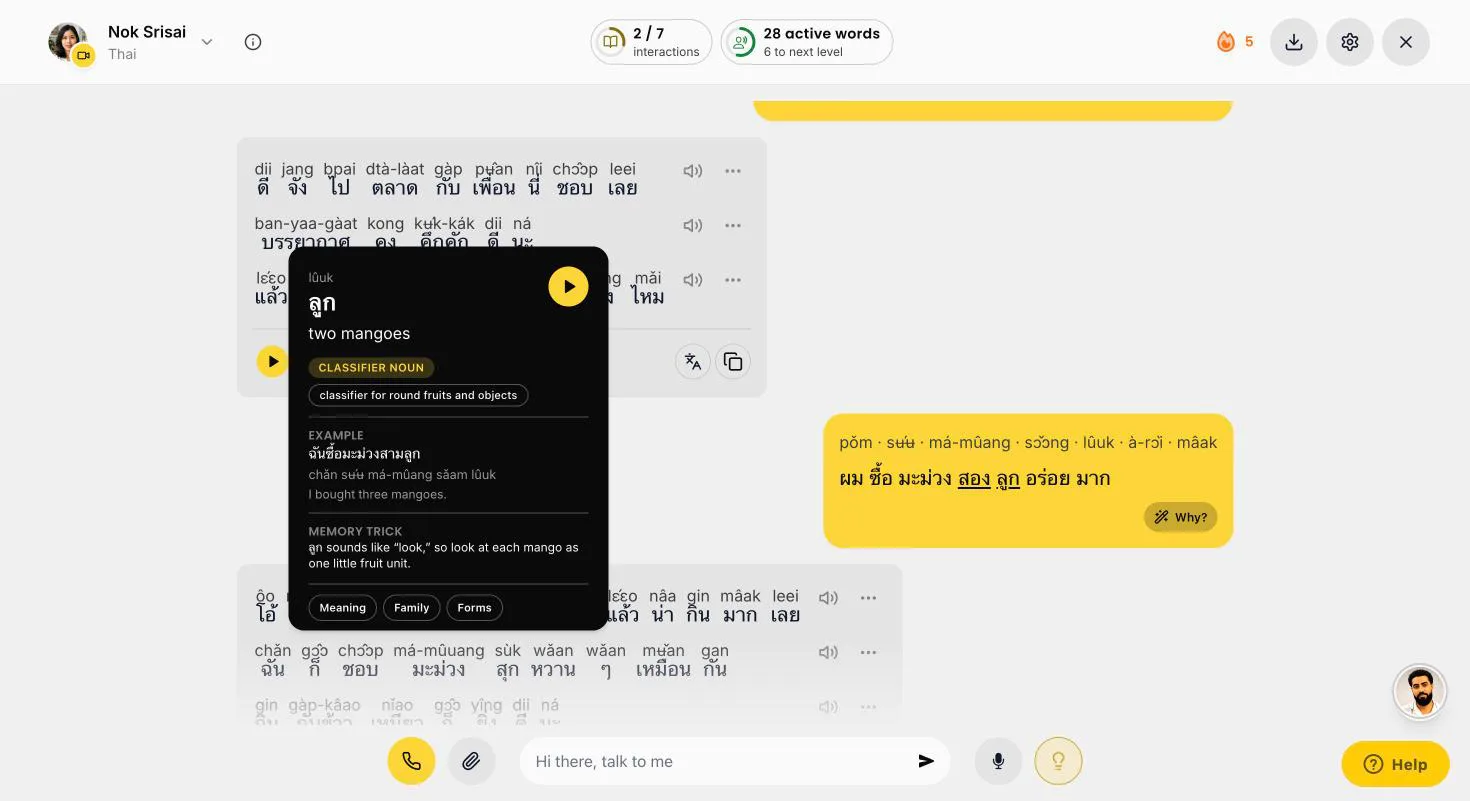
Tap any word, in a conversation, a video or a story, and you get its card: what it means, what kind of word it is, an example with the pronunciation, and a memory trick. Tap play to hear it.
ลูก
classifier for round fruits and objects
CLASSIFIER
Exampleฉันซื้อมะม่วงสามลูก (chǎn sʉ́ʉ má-mûang sǎam lûuk), I bought three mangoes.
Memory trickลูก sounds like “look”, so look at each mango as one little fruit unit.
ใกล้
near
ADJECTIVE
Exampleบ้านฉันอยู่ใกล้ตลาด (bâan chǎn yùu glâi dtà-làat), my house is near the market.
Watch the toneFalling tone. Say it flat, ไกล (glai), and it means far.
ครับ
polite ending, said by men
PARTICLE
Exampleขอบคุณครับ (kɔ̀ɔp-kun kráp), thank you.
Good to knowWomen say ค่ะ (kâ), or คะ (ká) in a question.
An illustration of three word cards, rebuilt for this page. On the real card, the wording depends on the word. Below: real screenshots of the web app.
Spaces, and Paiboon above every wordNok, from Bangkok, asks about the market. You write สองมะม่วง, two mangoes, and it gets fixed to มะม่วงสองลูก, with the classifier.Tap Why?Counted nouns need a classifier, after the number: มะม่วงสองลูก. You see the fix with Paiboon, a translation and why.Tap any wordลูก (lûuk), the classifier for round fruits and objects, with an example and a memory trick.
Meet your Thai teachers
Two teachers: Nok, from Bangkok, and Somchai, from Chiang Mai. Pick the one you like.
Nok Srisai
Bangkok · Thai
Somchai Suksawat
Chiang Mai · Thai
Input: Thai to watch and read, at your level
Here’s the input side up close. New words come from lots of Thai you hear and read, where you already understand most of it.
Watch and Read are on the web app for now, both with spaces between words and the pronunciation above each one. Words you read along with, without tapping, count toward your passive words. Every word you tap lands in your flashcards. And when you’re done, you talk about it with your teacher.
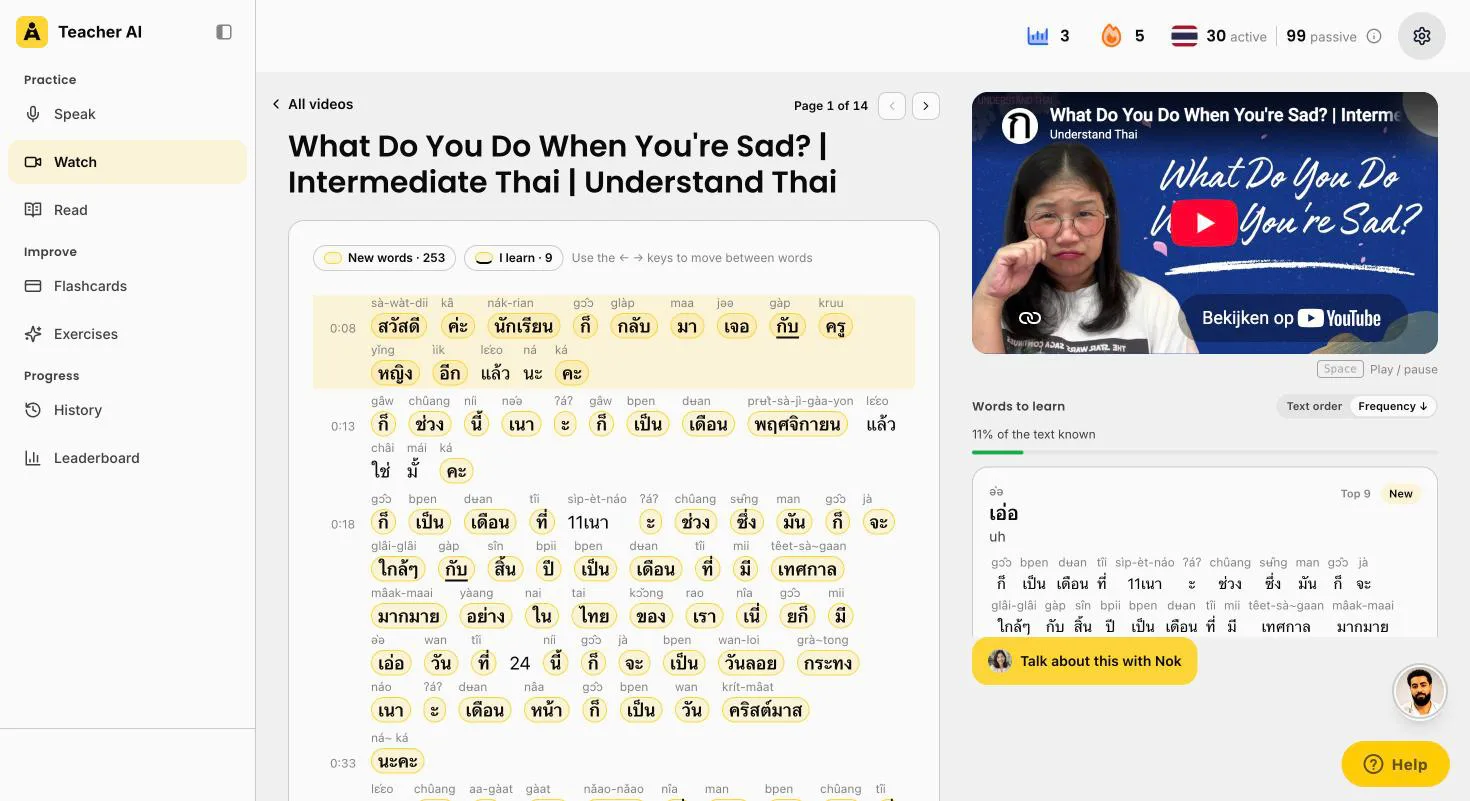
Your own YouTube videosPaste a link to a Thai YouTube video, or an Apple Podcasts episode. We turn it into a page you read along with: spaces between words, Paiboon above each one, new words in yellow. No subtitles? On a paid plan we transcribe it for you, within a monthly allowance.
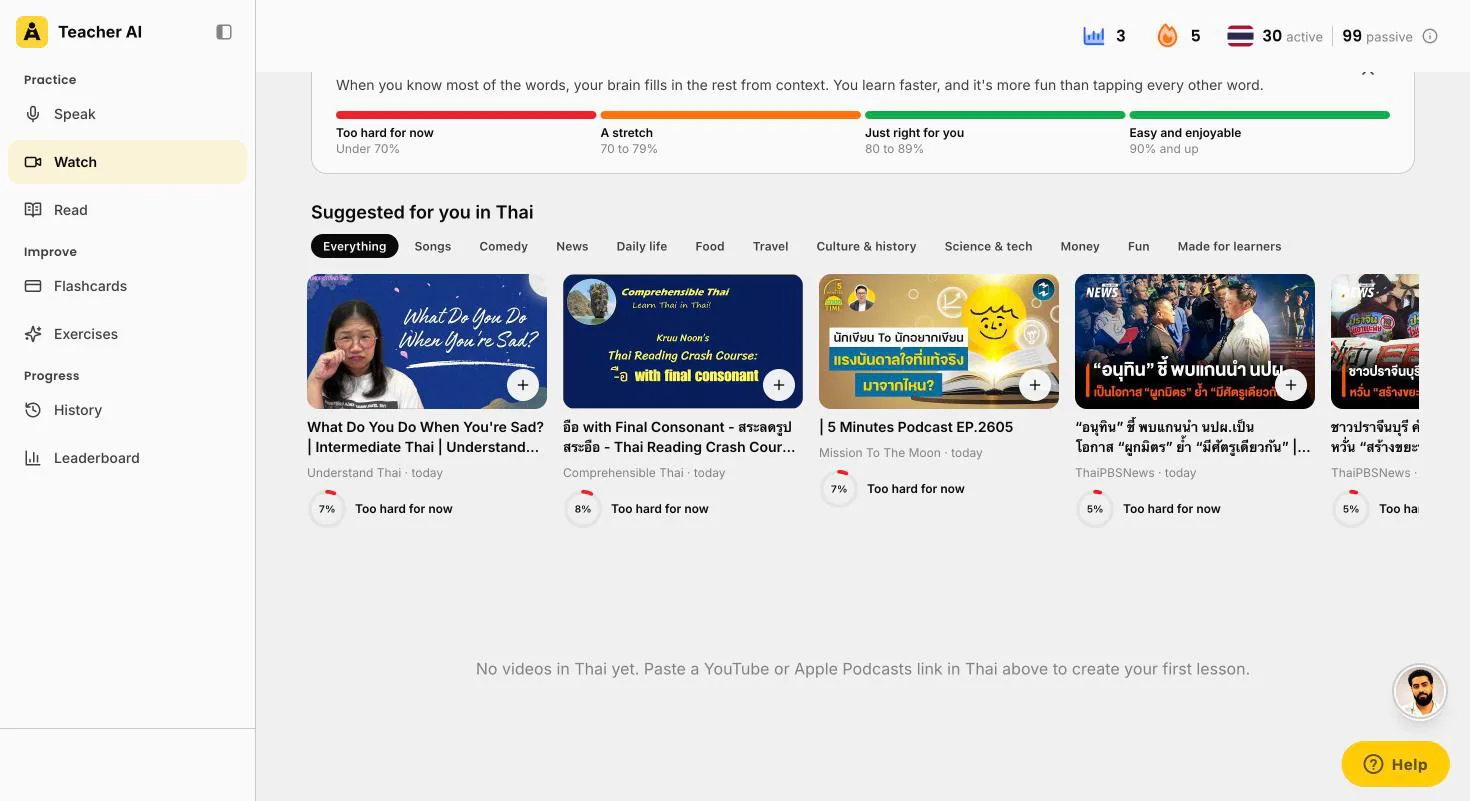
Suggested for youWatch suggests Thai videos by topic, from channels made for learners to podcasts and the news, each with the share of words you’d understand.
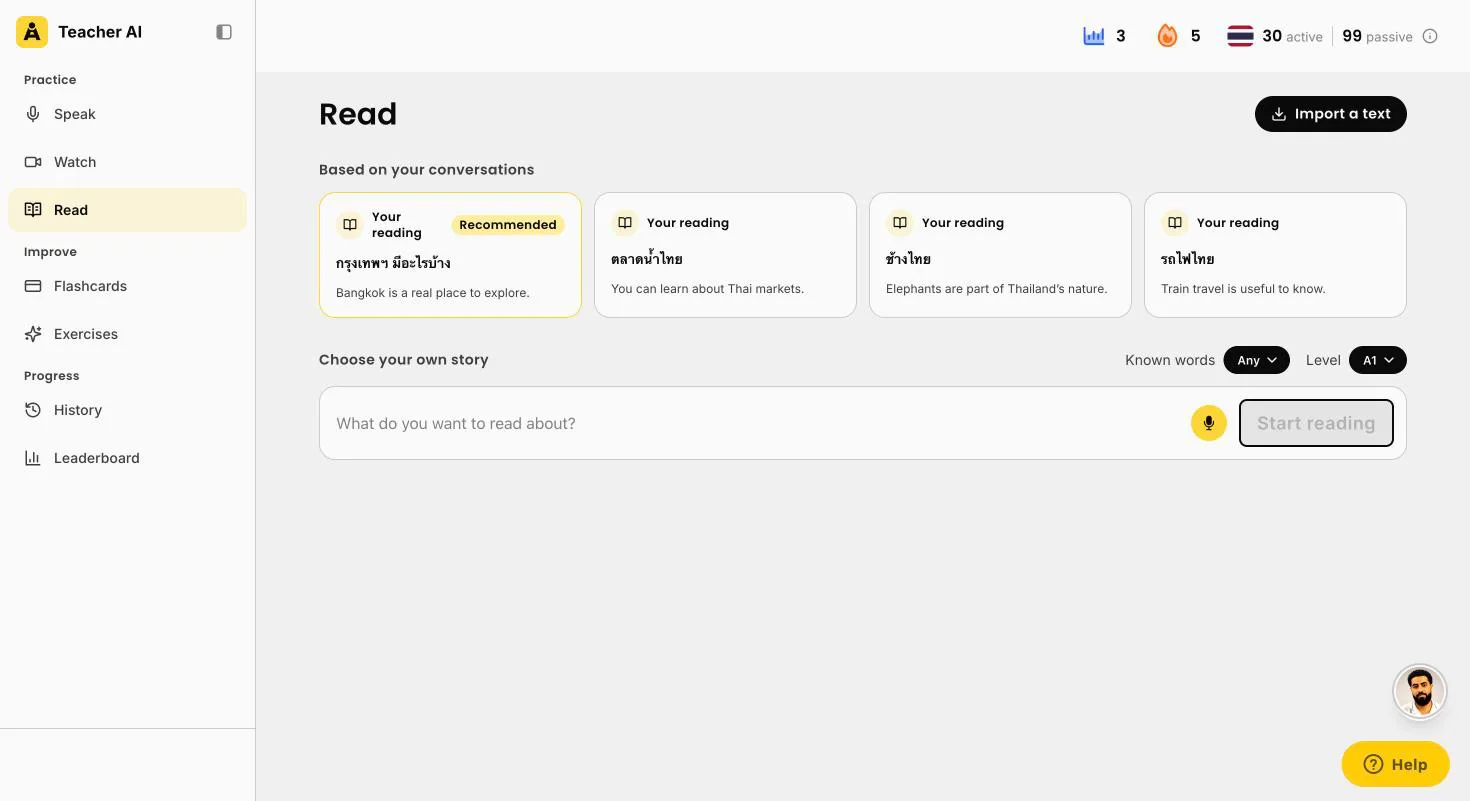
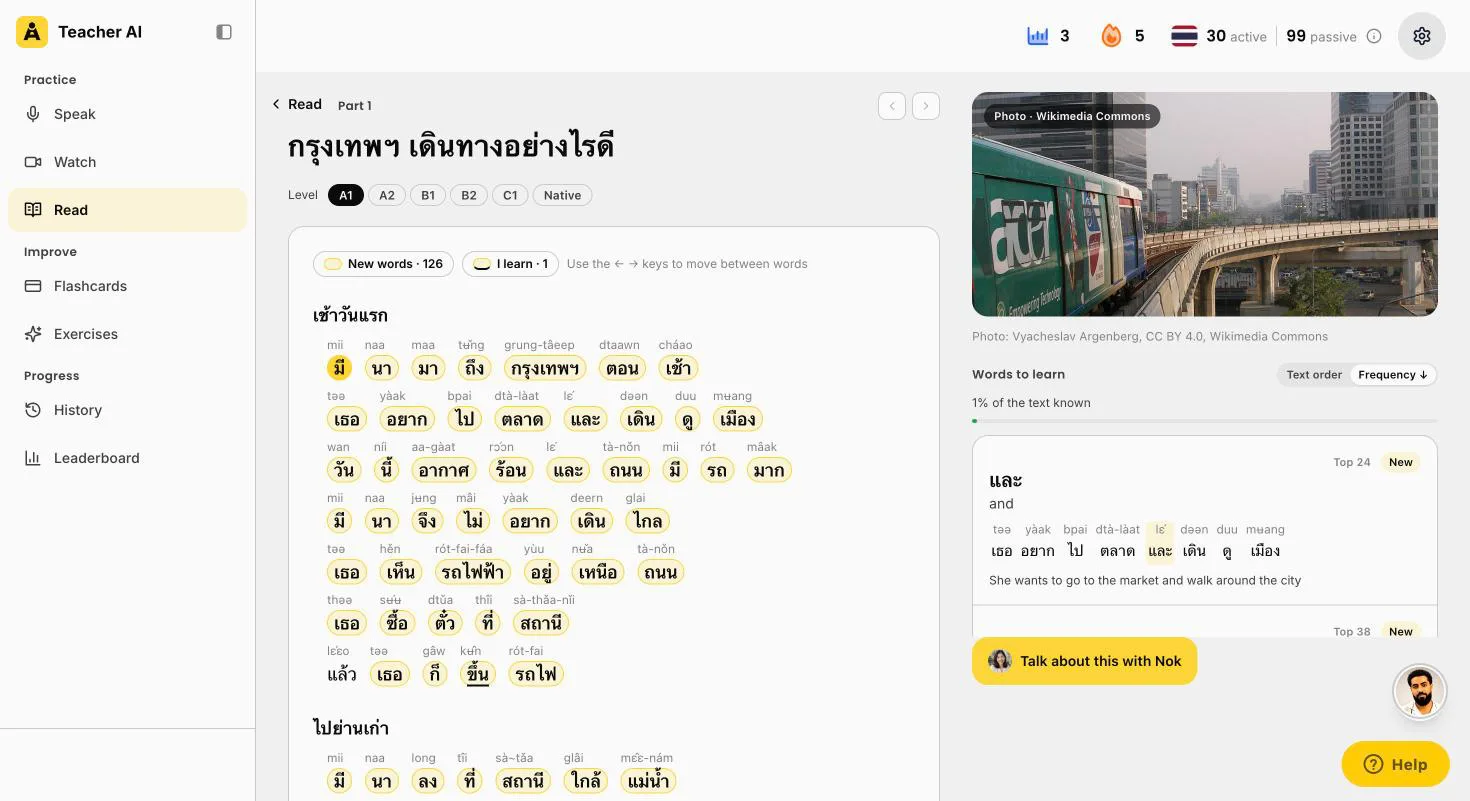
Stories written for youRead writes Thai texts at your level, from A1 to Native, about anything you like, and suggests ideas from what you talk about with your teacher.
How much you know, before you startTeacher AI keeps a list of every Thai word you’ve met: the ones you use when you talk, the ones you read or hear, the ones you tap. Thai has no spaces, so it cuts the text into words first. Then it checks every word against your list and shows you the share you already know.
The 80% rulePick videos and texts where you know 80% or more of the words. Then your brain fills in the rest from context. Under 70% is too much for now. 90% and up is easy and fun.
Then talk about itOne tap on Talk about this starts a conversation about what you just watched or read. Retelling it is how new words become words you can say.
Suggested for you in ThaiLearner channels, podcasts and the news, each with the share you’d understand. This account knows about 30 Thai words, so it’s all still too hard. That’s the honest answer.Paiboon in videos tooAn Understand Thai video as a lesson: spaces between words, Paiboon above each one, and new words in yellow.Ideas from your conversationsReading ideas from what you’ve talked about: Bangkok, floating markets, elephants, Thai trains.A story at your levelกรุงเทพฯ เดินทางอย่างไรดี, how to get around Bangkok, at A1, with Paiboon above every word.
Teacher AI or Duolingo?
Lots of people look for Thai on Duolingo first. It isn’t there: Duolingo has no Thai course for English speakers. Thai only shows up as a language Thai speakers learn other languages from. Here’s the comparison anyway, from Duolingo’s own pages.
Duolingo
Teacher AI
Thai course
None for English speakers.
Yes. Talk about anything, with two Thai teachers, from Bangkok and Chiang Mai.
Reading Thai
Not offered.
Spaces between words, and Paiboon+ or IPA above every word.
Open conversation
Not for Thai.
Unlimited on a paid plan, by voice or text, or hands-free in a call.
Where it works
iPhone, Android and web. Video Call and Roleplay only in the app.
iPhone, Android and web, conversations included.
Price (US)
Every course is free, with ads. Super Duolingo: $9.99 to $119.99 on the US App Store.
Start free on the website. Unlimited conversation: $149 a year on the web.
Love your Duolingo streak? Keep it for another language. For Thai you’ll need a different app, and for speaking Thai, that’s what Teacher AI is built for.
The apps side by side
Feature
Teacher AI
Talkpal
Ling
Duolingo
Teaches this language
Yes, from about A2
Yes, one of its 130+ languages
Yes. Thai is its flagship, with its own Thai app and 200+ lessons.
No. Duolingo has no Thai course.
Open conversation
Unlimited on a paid plan, by voice or text, or hands-free in a call. Free plan: one conversation.
Chat, audio-only Call Mode and roleplays. Unlimited on Premium.
Mostly scripted dialogue games. A separate Ling AI Tutor on the web (Thai only) has scenario-based AI chats.
No Thai course.
Corrections
During the conversation: your message is marked up, and Why? explains each fix.
Grammar and pronunciation feedback after your replies.
The AI Tutor corrects mistakes and explains why. In the app, speech recognition checks your answers.
No Thai course.
Pronunciation help
Replay your recording next to a native speaker saying the same line. No tone score.
Says it checks pronunciation, intonation and rhythm. Its Sentence Mode score is for selected languages, and doesn’t say if Thai is one.
Speech recognition aimed at the five Thai tones. No score on its pages.
No Thai course.
Reading aid for the script
Spaces between words, and Paiboon+ or IPA above every word, on word cards and flashcards. Switch them off when you’re ready.
A Romanization feature for non-Latin scripts. The system isn’t named.
Romanization next to the Thai script (switch it off in the dialogue game), and a Script tab for the alphabet.
No Thai course.
Where it works
Web, iOS and Android
Web, iOS and Android
iOS and Android, and the web per its FAQ. The AI Tutor runs on the web.
iOS, Android and web. Video Call and Roleplay: app only.
Super Duolingo: $9.99 to $119.99 on the US App Store, which doesn’t say which is monthly or yearly.
Free option
Start free on the website, no credit card.
10 minutes a day, free. 14-day trial, no payment up front.
The first 2 units. 7-day trial on the yearly plan only. AI Tutor: “free to explore”.
Every course is free, with ads.
Scroll the table sideways to see every app.
The apps, one by one
Teacher AI
Best for getting fluent: input, speaking and tracking
Reading Thai
Spaces between words, and the pronunciation above every word, in Paiboon+ or IPA, your choice. In the conversation, on word cards, conversation starters and flashcards. Switch them off when you’re ready.
Corrections
Your own sentence is fixed while you talk, and Why? explains it: a missing classifier, the word order, a better word.
Tones
Replay yourself, then hear a native speaker say the same line (the corrected version, if you made a mistake).
Progress
Your active and passive words, your practice time split into input and output, and 100 levels with the matching CEFR level.
Watch and Read
Turn a Thai YouTube video or podcast into a lesson (no subtitles? we transcribe it on a paid plan), and read stories at your level, both with spaces and Paiboon. Both show the share of words you already know. On the web app.
Not so good
Not for complete beginners: for Thai, it works best from about A2. And there’s no tone score.
Talkpal
Cheaper, with open AI chat
Thai
One of its 130+ languages, with its own Learn Thai page. Chat, audio-only Call Mode and roleplays with an AI tutor.
Strengths
Grammar and pronunciation feedback, and a Romanization feature for scripts like Thai. On the web and on your phone.
Not stated
Which romanization it uses, and whether its pronunciation score (Sentence Mode, “available for selected languages”) covers Thai or its tones.
Price
$119.99 a year or $19.99 a month on the US App Store. 10 minutes a day for free, and a 14-day trial.
Ling
Best step-by-step Thai course
Thai
Ling has its own Thai app: 200+ lessons, a Script tab with every consonant, vowel and tone mark, and speech recognition aimed at the five tones.
Conversation
In the app, dialogue games where you pick your answer, with romanization on or off. For AI chats, there’s a separate Ling AI Tutor on the web, Thai only, with scenario-based conversations, corrections and feedback on tones.
Price
$89.99 a year or $16.99 a month. The first 2 units are free. The AI Tutor is “free to explore”, and its pages don’t say what it costs after that.
Duolingo
No Thai course
Thai
Duolingo has no Thai course for English speakers. Thai is only a language that Thai speakers learn English and other languages from.
Where another app might suit you better
Want a structured audio course? Pimsleur teaches Standard Thai, also called Central Thai. Its new AI Conversation Coach only covers Japanese, Latin American Spanish and French so far, so not Thai.
Want lots of lessons with AI conversations? Memrise lists “75+ AI conversations” on its Thai course page, at $61.99 a year on the US App Store. Its help article about them is a year old, so check the app before you pay.
Mondly teaches Thai too, but its chatbot has you repeat or pick sentences the app gives you. That’s practice, not open conversation.
Prefer a human teacher? ThaiPod101 has audio lessons, recordings to compare yourself with, and 1-on-1 access to a teacher on Premium PLUS. No AI conversation.
And if you’re looking at Speak, Langua, Praktika, Babbel or Busuu: none of them teaches Thai to English speakers. (Speak only teaches English to Thai speakers.)
For getting fluent, Teacher AI. You talk about anything, every mistake comes with a Why?, and you see spaces between words and Paiboon+ or IPA above every word. Very few AI speaking apps teach Thai at all: Speak, Langua, Praktika and Duolingo don’t.
Does Speak teach Thai?
No. Speak teaches English speakers Spanish, French, Korean, Japanese, Italian and Mandarin. Thai is only on its list of native languages for learning English.
Do Talkpal or Ling have AI conversation in Thai?
Talkpal does: chat, calls and roleplays with an AI tutor, 10 minutes a day for free. Ling’s Thai app is mostly a course with scripted dialogues. Its separate Ling AI Tutor, on the web, adds scenario-based AI chats.
What is Paiboon+?
A popular way of writing Thai in Latin letters, with the tone marked on the vowel: ผม (I, said by men) is pǒm, ครู (teacher) is kruu. On Teacher AI you pick Paiboon+ or IPA, and switch it off once you read Thai.
Why are there spaces between the Thai words?
Thai is normally written without spaces between words, so at first you can’t tell where one word ends and the next begins. Teacher AI can add them, so you see where each word starts. Switch them off in the settings when you’re ready.
Can a complete beginner use Teacher AI for Thai?
Not really. For Thai, Teacher AI works best from about A2, once you can handle simple everyday sentences. Before that, you just don’t have enough words yet for open conversation. Starting from zero? Learn the basics with a course like Ling or Pimsleur first, then come here to talk. (Spanish and French are different: they have a beginner track from zero.)
Is Teacher AI only for speaking?
No. It’s a complete fluency system. Speaking is how you activate your Thai. On the web app you also grow it: turn a Thai YouTube video or podcast into a lesson, and read stories at your level, with spaces and Paiboon above every word. And Teacher AI tracks the words you understand and the words you use, so you see your progress in real numbers.
Can I learn Thai on Duolingo?
No. Duolingo has no Thai course for English speakers. Thai is only on its list as a language Thai speakers learn from. On Teacher AI you can practice spoken Thai from English, with spaces between words and Paiboon above every one.