Hebrew · For Hebrew without the vowels, with two teachers from Tel Aviv
The best AI apps to practice speaking Hebrew
Updated November 15, 2026. We checked every other app on its own website, help pages and app store page. See the sources.
We built Teacher AI, so of course we’re biased. That’s why we link every claim we make about another app, and tell you plainly when another app suits you better.
היה כיף! ראיתי הסרט את הסרט חדש החדש עם חברים.It was fun! I saw the new movie with friends.
2 small fixesWhy?
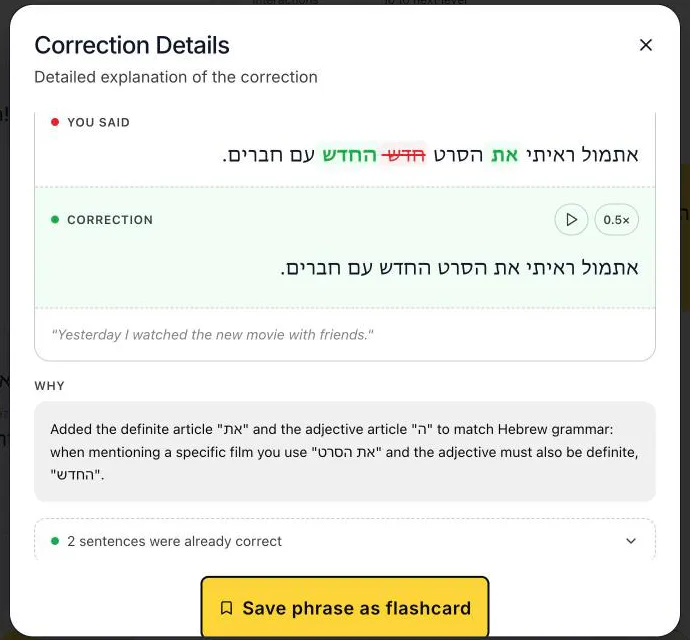
Why?Before a direct object with “the”, Hebrew needs את (et): ראיתי את הסרט. It has no English translation, so English speakers leave it out. And when a noun has ה, the, its adjective takes ה too: הסרט החדש, the new movie. Without it, הסרט חדש means “the movie is new”.
An illustration of the conversation screen, rebuilt for this page with Hebrew text.
The short answer
Here’s the short version: most big AI speaking apps don’t teach Hebrew. Speak, Langua, Praktika, Babbel and Busuu don’t offer it to English speakers. Duolingo has a free Hebrew course, but lists no AI conversation for it. And Hebrew is a middle-of-the-road language for English speakers: 32nd of the 67 in our ranking.
Here’s our honest take. Pick Teacher AI if you want to get fluent, not just practice. You get lots of real conversation, corrected as you go, with the transliteration above every word and two teachers from Tel Aviv. Plus Hebrew videos and stories at your level, and we track every word you learn. Pick Talkpal for the lowest price, and Israelingo if you want an app built only for Hebrew, with vowel marks you can switch on.
Starting from zero? Teacher AI works best for Hebrew from about A2. Learn the alphabet and the basics with Duolingo (free) or Pimsleur first.
Best for getting fluent: input, speaking and trackingTeacher AITalk about anything, for as long as you like, corrected as you go, with the transliteration above every word and two teachers from Tel Aviv. Grow your Hebrew with videos and stories at your level, and watch your active and passive words climb. Web, iPhone and Android, $149 a year.
Best price, with a free daily planTalkpalChat, calls and roleplays in Hebrew, one of its 130+ languages. $119.99 a year, or 10 minutes a day for free.
Built only for HebrewIsraelingoVoice conversations with AI tutors, with Latin letters and vowel marks you can switch on. A small, new app. iPhone and Android, $129.99 a year.
Best free startDuolingoA free Hebrew course, with ads, and a tab that teaches you the letters. No AI conversation in Hebrew listed.
A fluency system, built by polyglots
Teacher AI isn’t a chatbot with a language menu. It’s a fluency system, built by some of the most accomplished polyglots and language teachers around. People who learned many languages themselves, and know what actually gets you speaking.
Arieh Smith
Xiaoma · the world’s most viral polyglot
Lucas Bighetti
One of the world’s best polyglots · speaks 20+ languages
Olly Richards
Author · 2M+ books sold · StoryLearning founder
Jan van der Aa
Runs the leading network for online language entrepreneurs
“I’ve tried lots of this type of app. This is the best one. It feels like it’s created by someone who understands language learning.”
Jcalebmi, App Store review, October 2026
What you need to practice speaking Hebrew
Hebrew takes work. In our ranking of 67 languages it’s the 32nd hardest for English speakers, at 5,552 effort points. That’s almost twice what Spanish takes (2,941), a bit less than Russian (6,067) or Arabic (6,480), and right next to Greek (5,505).
The alphabet is the quick part: 22 letters, and most people can sound out words within a couple of weeks. What makes Hebrew hard is reading without vowels, and getting gender right at full speed, in a real conversation.
No vowels on the pageHebrew is normally written without its vowels. ספר can be sefer, a book, sapar, a barber, or siper, he told. The dots and dashes that mark vowels, called niqqud, show up in children’s books and poetry, and hardly anywhere else. You read from the words around it. Until then, you want the pronunciation above each word.
Verbs for him and her“You” and most verbs change with who you talk to. Do you want coffee? is אתה רוצה קפה? (ata rotse kafe) to a man, and את רוצה קפה? (at rotsa kafe) to a woman. And רוצה is spelled the same both times: without vowels, you only hear the difference. Your own gender counts too. A man says אני גר (ani gar), I live, a woman אני גרה (ani gara).
Three-letter rootsMost words are built from a root of three letters. כ-ת-ב is writing: כתב (katav), he wrote, מכתב (mikhtav), a letter, כתובת (ktovet), an address, התכתבנו (hitkatavnu), we wrote to each other. Knowing the root helps you guess new words. Using it means picking the right pattern and the right ending while you talk.
Sounds from the throatThe ר is said at the back of the throat, close to a French r, and ח is the kh in Scottish loch: חבר (khaver), friend. Most Israelis say ח and כ the same way, so you hear one sound and have to learn which letter it is. The quickest fix: say your sentence, then hear a native speaker say the same one.
Lots of Hebrew you understandSpeaking activates the words you have. New words come from input: videos, podcasts and texts where you already understand most of it.
Lots of speaking timeHebrew takes almost twice the hours of Spanish, one of the easiest languages for English speakers, and most of them should be spent talking. A few minutes a day won’t get you there.
A complete fluency system, not just a speaking app
Our speaking practice is the heart of Teacher AI. But speaking alone won’t make you fluent, and neither will input alone. You need both, and you need to see it working. With Hebrew that matters even more: apart from a few words like שלום (shalom), almost every word is new to you, so you need to meet each one many times.
So Teacher AI is a complete fluency system. Input grows your Hebrew. Speaking activates it. And we track every word along the way, to get you to real fluency as fast as we can.
Step 1Input grows your vocabularyWatch Hebrew YouTube videos and podcasts, and read stories written at your level, with the transliteration above every word. You always see how much you already understand, and every word you tap becomes a flashcard. How Watch and Read work.
Step 2Speaking activates itRecognizing a word isn’t the same as saying it, with the right form for a man or a woman and the right pattern from its root. Talking with your teacher, for as long as you like, is how words move from “I know that one” to “I just said it”. Every mistake gets fixed, with a Why?.
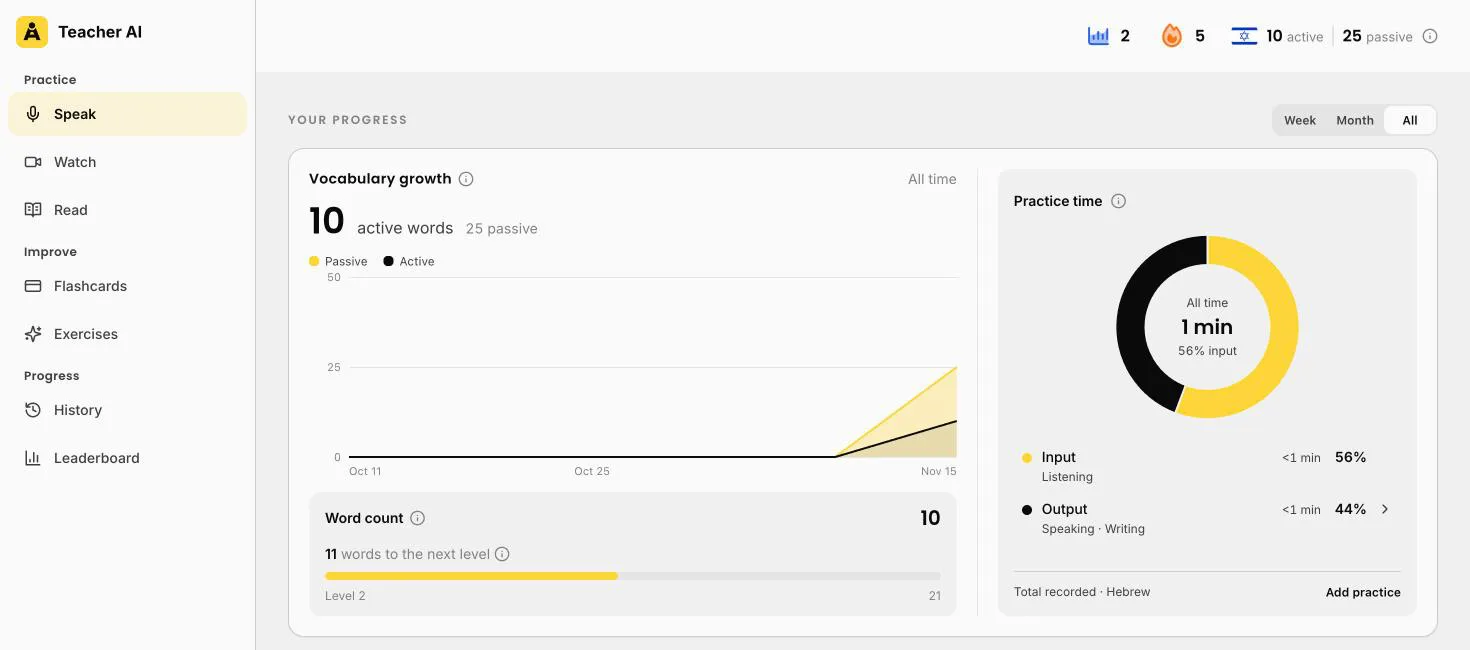
Step 3We track every wordYour passive words are the ones you understand when you read or hear them. Your active words are the ones you’ve used yourself. You see both grow, how your time splits between input and output, and how many words to your next level.
Brand new to Hebrew? Start somewhere else first. Teacher AI works best from about A2, once you can handle simple everyday sentences. Before that, you just don’t have enough words yet for open conversation. So learn the alphabet and the basics with Duolingo, which teaches Hebrew for free and has a tab for the letters, or with Pimsleur. Then come back when you want to talk.
Your progress, in wordsDay one in Hebrew: 10 words used, 25 understood. You see your active and passive words grow, the words to your next level, and your practice time split into input and output.
What it looks like in Hebrew
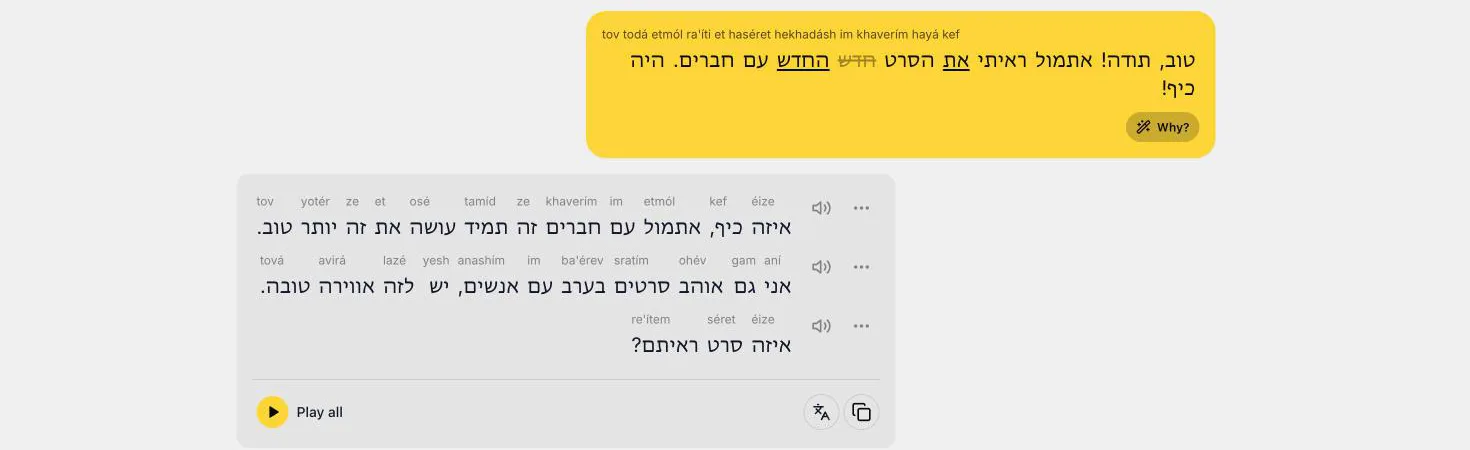
Here’s what a moment of practice looks like. You answer, your teacher replies with the pronunciation above every word, and if you made a mistake, your sentence gets fixed right there.
A card for every word you tap
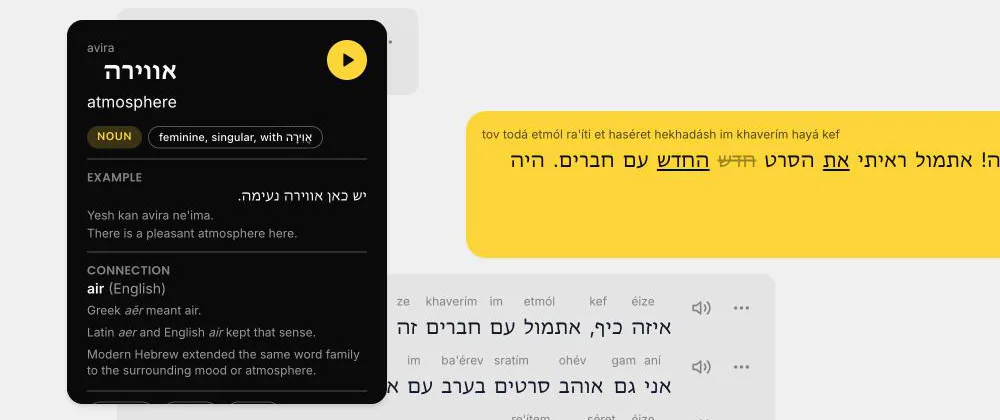
Tap any word, in a conversation, a video or a story, and you get its card: what it means, how to say it, what kind of word it is, and an example with a translation. Tap play to hear it.
סבבהsababa
cool, fine, sounds good
INTERJECTION
Exampleנפגש בשמונה? סבבה. Meet at eight? Sounds good.
Good to knowBorrowed from Arabic, and you’ll hear it everywhere in Israel. It’s casual, so not for a job interview.
מכתבmikhtav
a letter (that you post)
NOUN
Exampleקיבלתי מכתב מהבנק. I got a letter from the bank.
Good to knowIt comes from the root כ-ת-ב, writing: כתב (katav) is he wrote, כתובת (ktovet) an address. One root, a whole family of words.
חבלkhaval
what a shame, too bad
EXPRESSION
Exampleחבל שלא באת! Too bad you didn’t come!
Good to knowחבל על הזמן (khaval al ha-zman), literally “a pity about the time”, can mean a waste of time, or, in slang, amazing. You tell which from the tone.
An illustration of three word cards, rebuilt for this page. On the real card, the wording depends on the word. Below: real screenshots of the web app.
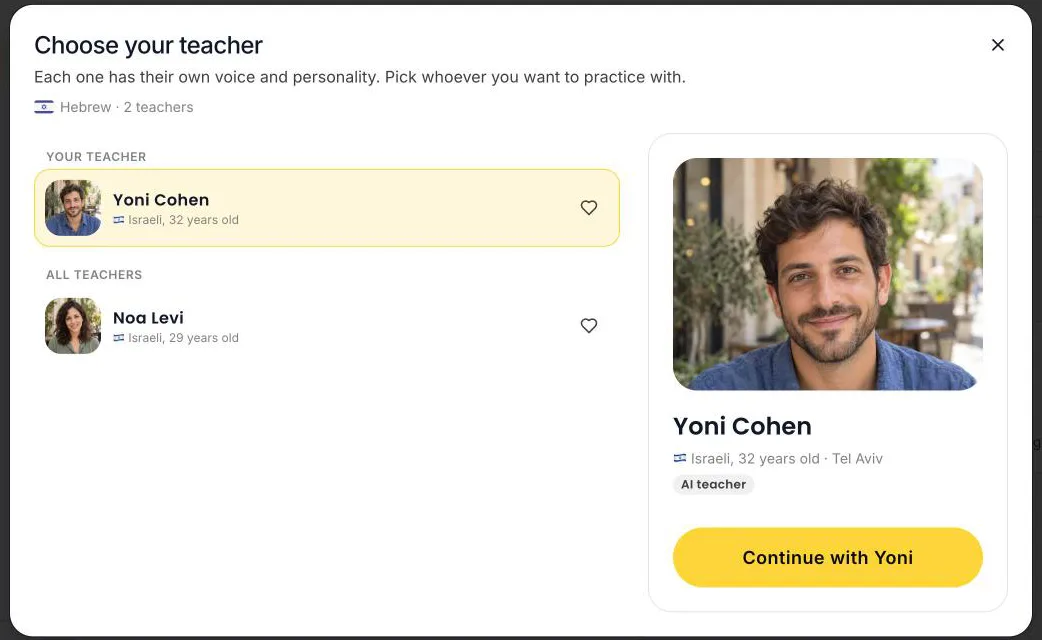
Corrected while you talkYou tell Yoni about a film. ראיתי הסרט becomes ראיתי את הסרט, and חדש becomes החדש. Above every word: how to say it, with the stress marked.Tap Why?A definite object takes את (et), and the adjective takes ה too: את הסרט החדש, the new film. You see the fixed sentence, a translation and why, and you can save it as a flashcard.Tap any wordTap אווירה and you get atmosphere, how to say it (avira), an example, and its link to English air.Two teachers from Tel AvivYoni and Noa, each with their own voice. Your chat history stays when you switch.
Meet your Hebrew teachers
Two teachers, both from Tel Aviv: Noa and Yoni. Pick the one you like, or switch between them. It’s good practice: to Noa you say את (at) for “you”, to Yoni אתה (ata).
Noa Levi
Tel Aviv · Israeli
Yoni Cohen
Tel Aviv · Israeli
Input: Hebrew to watch and read, at your level
Here’s the input side up close. New words come from lots of Hebrew you hear and read, where you already understand most of it.
Watch and Read are on the web app for now, both with the transliteration above every word. Words you read along with, without tapping, count toward your passive words. Every word you tap lands in your flashcards. And when you’re done, you talk about it with your teacher.
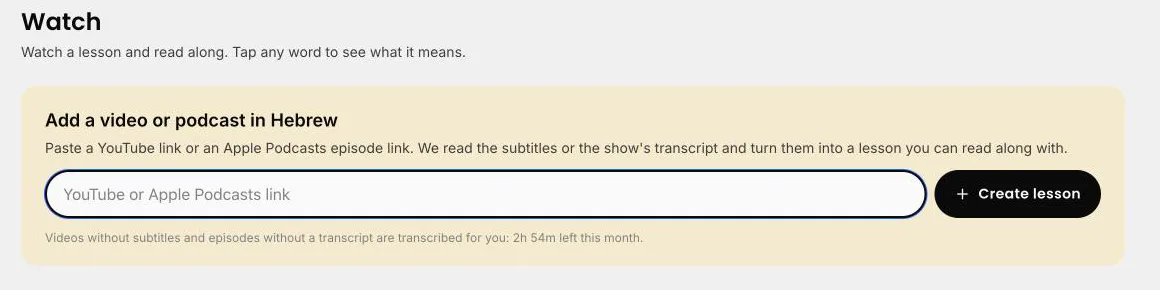
Any YouTube videoPaste a link to a Hebrew YouTube video, or an Apple Podcasts episode. An Israeli podcast, a cooking show, a Tel Aviv vlog: you pick. We turn it into a page you read along with, new words in yellow. No subtitles? On a paid plan we transcribe it for you, within a monthly allowance.
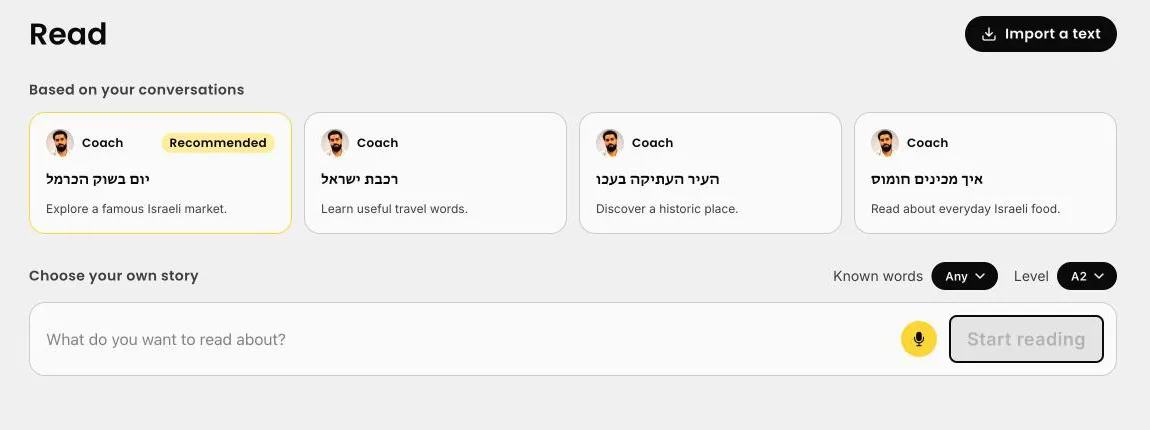
Stories written for youRead writes Hebrew texts at your level, from A1 to Native, about anything you like, and suggests ideas from what you talk about with your teacher.
How much you know, before you startTeacher AI keeps a list of every Hebrew word you’ve met: the ones you use when you talk, the ones you read or hear, the ones you tap. It checks every word of a video or text against that list and shows you the share you already know.
The 80% rulePick videos and texts where you know 80% or more of the words. Then your brain fills in the rest from context. Under 70% is too much for now. 90% and up is easy and fun.
Then talk about itOne tap on Talk about this starts a conversation about what you just watched or read. Retelling it is how new words become words you can say.
Paste any Hebrew videoPaste a link to a Hebrew YouTube video or podcast and it becomes a lesson. No subtitles? On a paid plan we transcribe it, within a monthly allowance.Ideas to readThe Carmel market, the train across Israel, Old Akko, and hummus. Or ask for any topic.A story at your levelמה קונים בשוק הכרמל?, what do people buy at the Carmel market?, at A2. How to say each word sits above it, and new words are in yellow.
Teacher AI or Duolingo?
Lots of people start Hebrew on Duolingo: 1.3 million learners, it says. Good! So here’s how the two compare for speaking, with every Duolingo fact from Duolingo’s own pages.
Duolingo
Teacher AI
What it’s built for
Short lessons and exercises, as a daily game.
Conversation, plus Hebrew to watch and read at your level, with every word you learn tracked.
Open conversation
Not for Hebrew. Duolingo’s pages list AI Video Call and Roleplay for other languages, not Hebrew.
Unlimited on a paid plan, by voice or text, or hands-free in a call.
Reading Hebrew
A reading tab that teaches you the letters and their sounds.
The transliteration above every word. No alphabet lessons, so learn the letters too.
Corrections
Exercises are checked right or wrong. Explain My Answer isn’t listed for Hebrew.
During the conversation: your own sentence is fixed, and Why? explains each fix.
Teachers
Duolingo’s own characters.
Two, with their own voices: Noa and Yoni, both from Tel Aviv.
Starting from zero
Yes. The course starts at the beginning, for free.
No. For Hebrew, Teacher AI works best from about A2.
Where it works
iPhone, Android and web. Video Call and Roleplay only in the app.
iPhone, Android and web, conversations included.
Price (US)
Every course is free, with ads. Super Duolingo: $9.99 to $119.99 on the US App Store.
Start free on the website. Unlimited conversation: $149 a year on the web.
Duolingo is a good free way to learn the letters and your first Hebrew words, and you can keep your streak. Teacher AI doesn’t have a step-by-step Hebrew course. Once you reach about A2 and want to talk, that’s what Teacher AI is built for. Lots of people use both.
The apps side by side
Feature
Teacher AI
Talkpal
Israelingo
Duolingo
Teaches this language
Yes, from about A2, with 2 teachers, both from Tel Aviv.
Yes, one of its 130+ languages.
Yes, Hebrew only, “from complete beginner to near-native”.
Yes, from English. Its pages don’t say what level it reaches.
Open conversation
Unlimited on a paid plan, by voice or text, or hands-free in a call. Free plan: one conversation.
Chat, audio-only Call Mode and roleplays. Unlimited on Premium.
Voice and text conversations with two AI tutors, plus role-plays and free talk.
Video Call and Roleplay aren’t listed for Hebrew.
Corrections
During the conversation: your message is marked up, and Why? explains each fix.
Feedback after each reply, and a tool that explains any sentence.
“Only when you want them”: tap a pencil icon for feedback.
Explain My Answer isn’t listed for Hebrew.
Pronunciation help
Replay your recording next to a native speaker saying the same line. No pronunciation score.
Says it analyzes pronunciation, intonation and rhythm. Its Sentence Mode score is for selected languages, and doesn’t say if Hebrew is one.
Not stated.
Speaking exercises and speaking practice sets. No pronunciation score on its pages.
Reading aid for the script
Hebrew script, with the transliteration above every word, in chats, videos and stories. Learn the alphabet anyway: you’ll read faster. To type, add a Hebrew keyboard, or just speak.
A Romanization feature for non-Latin scripts. It doesn’t say if that includes Hebrew.
Optional Latin letters for every word, and optional niqqud (vowel marks).
A reading tab that teaches the letters and their sounds.
Where it works
Web, iOS and Android
Web, iOS and Android
iPhone, and Android (Google Play).
iOS, Android and web. Video Call and Roleplay: app only.
$119.99/year or $19.99/month. On the web, $149.99 for 24 months.
$129.99/year or $19.99/month (US App Store).
Super Duolingo: $9.99 to $119.99 on the US App Store, which doesn’t say which is monthly or yearly.
Free option
Start free on the website, no credit card.
10 minutes a day, free. 14-day trial, no payment up front.
Free to download, no credit card. What’s free isn’t stated.
Every course is free, with ads.
Scroll the table sideways to see every app.
The apps, one by one
Teacher AI
Best for getting fluent: input, speaking and tracking
Speaking
Unlimited on a paid plan. Pick a conversation starter at your level, talk about anything in Free Talk, try a roleplay, or switch to hands-free and just talk.
Reading Hebrew
The transliteration above every word, in the conversation, in Watch and in Read. Learn the letters anyway, and lean on it less as you go.
Teachers
Two for Hebrew, both from Tel Aviv: Noa and Yoni.
Corrections
Your own sentence is fixed while you talk, and Why? explains it: a missing את, a verb in the wrong form for a man or a woman, a more natural word.
Progress
Your active and passive words, your practice time split into input and output, and 100 levels with the matching CEFR level.
Watch and Read
Turn a Hebrew YouTube video or podcast into a lesson (no subtitles? we transcribe it on a paid plan), and read stories at your level. Both show the share of words you already know. On the web app.
Not so good
Not for complete beginners: for Hebrew, it works best from about A2, so learn the alphabet and the basics with Duolingo or Pimsleur first. And there’s no pronunciation score.
Talkpal
Best price, with a free daily plan
Speaking
Hebrew is one of its 130+ languages. Chat, audio-only Call Mode and roleplays with an AI tutor. Unlimited on Premium, 10 minutes a day for free.
Not stated
Whether its Romanization feature or its pronunciation score (Sentence Mode, “available for selected languages”) covers Hebrew. Its Learn Hebrew page doesn’t mention either.
Price
$119.99 a year or $19.99 a month on the US App Store, with a 14-day trial.
Israelingo
Built only for Hebrew
Speaking
Voice and text conversations with two AI tutors, Noa and Uri, plus role-plays, free talk and lessons built around everyday situations. It says it works “from complete beginner to near-native”.
Reading Hebrew
You can switch on Latin letters for every word, and niqqud, the vowel marks. Corrections come “only when you want them”, with a tap on a pencil icon.
Not so good
A small, new app: 6 ratings on the US App Store. No pronunciation score stated, and its pages don’t say what’s free. $129.99 a year.
Duolingo
Best free start
Course
A free Hebrew course, with 1.3 million learners. A reading tab teaches the letters and their sounds.
Speaking
Speaking exercises for free. But its pages list neither Video Call nor Roleplay for Hebrew, and Explain My Answer isn’t listed for Hebrew either.
Not so good
No open conversation in Hebrew listed. Its pages don’t say what level the course reaches.
Where another app might suit you better
Want a structured audio course? Pimsleur’s Hebrew has 3 levels, up to intermediate. Its AI Conversation Coach covers only Japanese, Latin American Spanish and French, so not Hebrew.
Want lots of lessons with AI conversations? Memrise lists 400+ lessons and “75+ AI conversations” on its Hebrew course page, at $61.99 a year on the US App Store.
Want a translator that knows “to a man” from “to a woman”? baba Hebrew translates with gender controls and has 200+ Israeli slang terms. Its Voice Tutor, which corrects you in conversation, is on the Pro+ plan, $114.99 a year.
Ling and Mondly teach Hebrew too. Ling’s speaking lessons check you with speech recognition, and Mondly’s chatbot has you repeat sentences the app gives you. That’s practice, not open conversation.
And if you’re looking at Speak, Langua, Praktika, Babbel, Busuu or Jumpspeak: none of them teaches Hebrew to English speakers.
For getting fluent, Teacher AI: talk about anything for as long as you like, with two teachers from Tel Aviv, the transliteration above every word, and a Why? on every correction. Plus Hebrew videos and stories at your level, and every word you learn tracked. For the lowest price, Talkpal. For an app built only for Hebrew, Israelingo. Very few AI speaking apps teach Hebrew at all: Speak, Langua and Praktika don’t.
How do I read Hebrew without vowels?
Slowly at first, then from context. Everyday Hebrew leaves the vowels out, so ספר can be a book (sefer) or a barber (sapar), and you tell which from the sentence. On Teacher AI you see the transliteration above every Hebrew word, in your conversations, videos and stories, so you always know how a word sounds while you learn to read. Israelingo lets you switch on niqqud, the vowel marks, and Duolingo has a tab that teaches the letters.
Is Hebrew hard to learn?
Middle of the pack for English speakers. In our ranking of 67 languages, Hebrew is the 32nd hardest, at 5,552 effort points, almost twice the effort of Spanish. The alphabet takes a couple of weeks. The work is in reading without vowels, the vocabulary with few English links, and verbs that change for a man or a woman, at full speed.
Do Hebrew verbs really change for a man or a woman?
Yes, most of them, and so does “you”. A man says אני גר בתל אביב (ani gar be-tel aviv), I live in Tel Aviv, and a woman says אני גרה (ani gara). And “you” is את (at) to a woman, אתה (ata) to a man. The past tense of “I” is the same for both, which helps. You get it right by saying it, many times.
Does Speak teach Hebrew?
No. Speak teaches English speakers Spanish, French, Korean, Japanese, Italian and Chinese.
Can a complete beginner use Teacher AI for Hebrew?
Not really. For Hebrew, Teacher AI works best from about A2, once you can handle simple everyday sentences. Before that, you just don’t have enough words yet for open conversation. Starting from zero? Learn the alphabet and the basics with Duolingo (free) or Pimsleur first, then come here to talk. (Spanish and French are different: they have a beginner track from zero.)
Is Teacher AI only for speaking?
No. It’s a complete fluency system. Speaking is how you activate your Hebrew. On the web app you also grow it: turn a Hebrew YouTube video or podcast into a lesson, and read stories at your level. And Teacher AI tracks the words you understand and the words you use, so you see your progress in real numbers.
Is Teacher AI better than Duolingo for speaking Hebrew?
For speaking, yes. Teacher AI is built around conversation, unlimited on a paid plan, on the web and on your phone. Duolingo’s Hebrew course is free and teaches you the letters, but its pages list neither Video Call nor Roleplay for Hebrew. Lots of people use both: Duolingo for the basics and a daily habit, Teacher AI for the conversations.