Japanese · With furigana or romaji, and a kanji count

The best AI apps to practice speaking Japanese

Updated November 15, 2026. We checked every other app on its own website, help pages and app store page. See the sources.

We built Teacher AI, so of course we’re biased. That’s why we link every claim we make about another app, and tell you plainly when another app suits you better.

Available oniPhone and iPadAndroidWeb app

An illustration of the conversation screen, rebuilt for this page with Japanese text.

The short answer

Japanese is the hardest language in our ranking for English speakers. The good news: almost every AI speaking app teaches it. Speak, Langua, Talkpal, Praktika and Duolingo all do. Babbel doesn’t.

Here’s our honest take. Pick Teacher AI if you want to get fluent, not just practice. You get lots of real conversation, with furigana above the kanji (or romaji, if you prefer) and a Why? on every correction. Plus Japanese videos and stories at your level, and we track every word you learn, and every kanji. Pick Langua if you want furigana in a chat on the web too, and Speak for a polished course on your phone.

Starting from zero? Teacher AI works best for Japanese from about A2. Learn kana and the basics with Duolingo, Speak or Pimsleur first.

  1. Best for getting fluent: input, speaking and trackingTeacher AITalk about anything, for as long as you like, with furigana above the kanji (or romaji) and every mistake explained. Grow your Japanese with videos and stories at your level, and watch your words and your kanji count climb. Web, iPhone and Android, $149 a year.
  2. Furigana in chat, on the web tooLanguaThe one other big AI speaking app with furigana and romaji you can switch on, in its chat modes (not yet in calls). $149.99 a year, or 3 minutes of calls a day for free.
  3. Best guided course on your phoneSpeakJapanese for English speakers, beginner to intermediate, with AI roleplays and Tutor Lessons. Speak still calls the course beta. Phone only, from $83.99 a year.
  4. Best free start with kana and kanjiDuolingoHiragana and katakana from day one, romaji you can switch off, and kanji lessons. Free, with ads. Its own pages disagree on whether Video Call covers Japanese.
  5. Best for video calls with an avatarPraktikaLifelike AI tutors, and Japanese from A0 to C2. Phone only, and its pages don’t mention furigana.

A fluency system, built by polyglots

Teacher AI isn’t a chatbot with a language menu. It’s a fluency system, built by some of the most accomplished polyglots and language teachers around. People who learned many languages themselves, and know what actually gets you speaking.

  • Arieh Smith
    Arieh Smith
    Xiaoma · the world’s most viral polyglot
  • Lucas Bighetti
    Lucas Bighetti
    One of the world’s best polyglots · speaks 20+ languages
  • Olly Richards
    Olly Richards
    Author · 2M+ books sold · StoryLearning founder
  • Jan van der Aa
    Jan van der Aa
    Runs the leading network for online language entrepreneurs

“I’ve tried lots of this type of app. This is the best one. It feels like it’s created by someone who understands language learning.”

Jcalebmi, App Store review, October 2026

What you need to practice speaking Japanese

Japanese is the big one. In our ranking of 67 languages it’s the hardest for English speakers, at 10,097 effort points. That’s more than three times what Spanish takes.

But look at where the work is. Almost a third of it is writing: three scripts, and about two thousand kanji in everyday use. Speaking is a lot closer than reading. So you need a few things a Spanish learner doesn’t.

  • Furigana, until you don’t need itYou can’t sound out a kanji you haven’t met, and most have more than one reading. Furigana writes the reading in small hiragana above it: 先生 is せんせい, sensei. You want it while you talk, and a switch to turn it off later.
  • Three scripts in one sentenceHiragana, katakana and kanji, all mixed: 私はコーヒーが好きです, I like coffee. Kana take a few weeks. Kanji take years, so you want them to come with their reading.
  • Particlesは, が, に, で, を: tiny words that say who does what, and where. Everyone mixes them up at first, so you want them fixed while you talk.
  • Polite and casual JapaneseYou say です and ます to people you don’t know, and drop them with friends. You learn the difference fastest by hearing both, over and over.
  • Pitch you can hearJapanese has pitch accent: 雨 (rain) and 飴 (candy) are both ame, said with a different pitch. The quickest fix: say your sentence, then hear a native speaker say the same one.
  • Lots of Japanese you understandSpeaking activates the words you have. New words and kanji come from input: videos, podcasts and texts where you already understand most of it.
  • Lots of speaking timeA language this hard takes hours of talking. A few minutes a day won’t get you there.

A complete fluency system, not just a speaking app

Our speaking practice is the heart of Teacher AI. But speaking alone won’t make you fluent, and neither will input alone. You need both, and you need to see it working. With Japanese that matters even more: apart from loanwords like コーヒー, almost no word looks like anything you know, so you need to meet each one many times.

So Teacher AI is a complete fluency system. Input grows your Japanese. Speaking activates it. And we track every word along the way, to get you to real fluency as fast as we can.

  1. Step 1Input grows your vocabularyWatch Japanese YouTube videos and podcasts, and read stories written at your level, with furigana above the kanji. You always see how much you already understand, and every word you tap becomes a flashcard. How Watch and Read work.
  2. Step 2Speaking activates itRecognizing a word isn’t the same as saying it, with the right particle, without thinking. Talking with your teacher, for as long as you like, is how words move from “I know that one” to “I just said it”. Every mistake gets fixed, with a Why?.
  3. Step 3We track every word, and every kanjiYour passive words are the ones you understand when you read or hear them. Your active words are the ones you’ve used yourself. You see both grow, how your time splits between input and output, and how many different kanji are in the words you understand.

Brand new to Japanese? Start somewhere else first. Teacher AI works best from about A2, once you can handle simple everyday sentences. Before that, you just don’t have enough words yet for open conversation. So learn kana and the basics with Duolingo, Speak or Pimsleur, which all teach Japanese from zero, and come back when you want to talk.

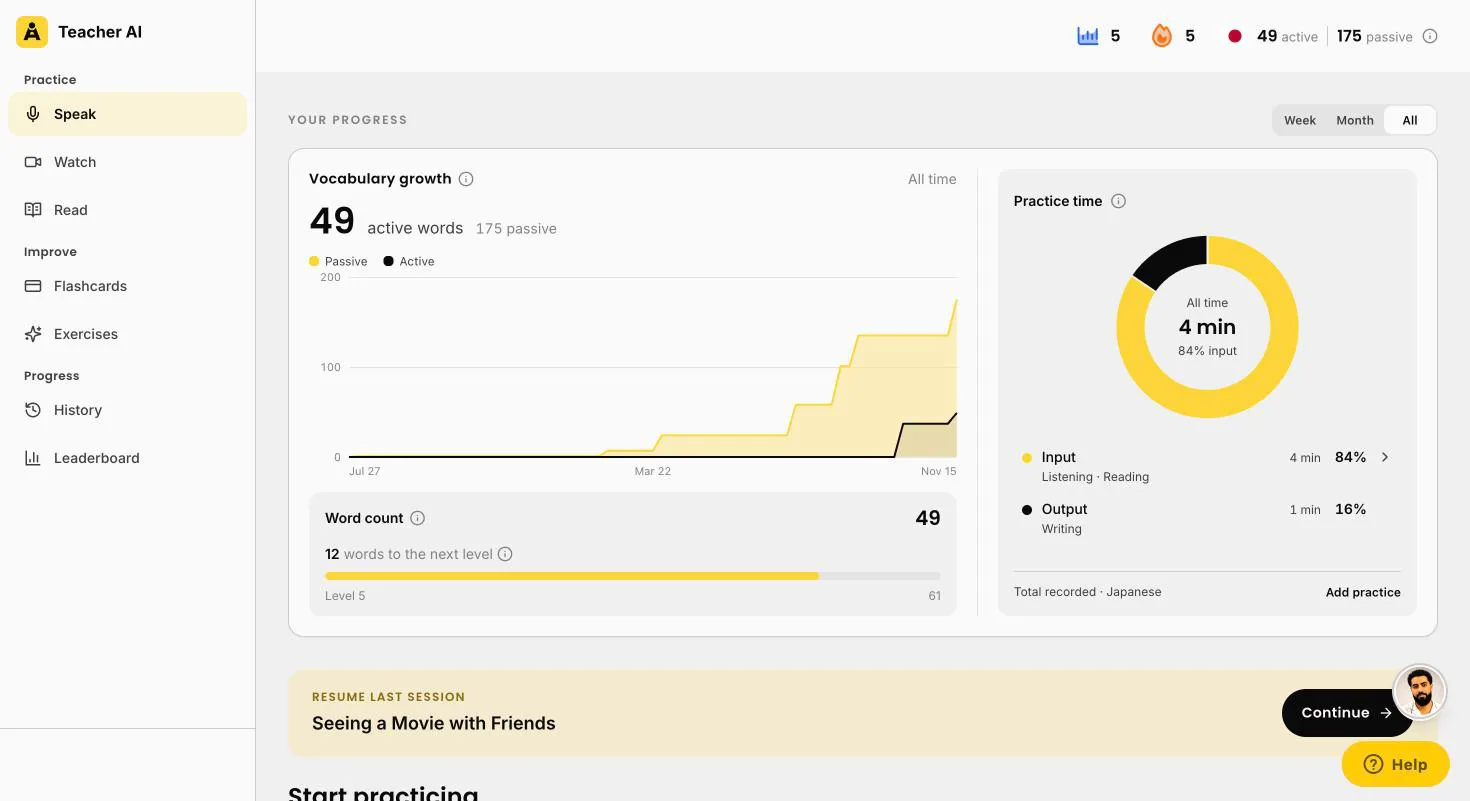
Teacher AI progress in Japanese: active and passive words over time, the words to the next level, and practice time split into input and output
Your progress, in wordsYour active and passive words over time, the words to your next level, and your practice time split into input (listening, reading, watching) and output (speaking, writing, flashcards).
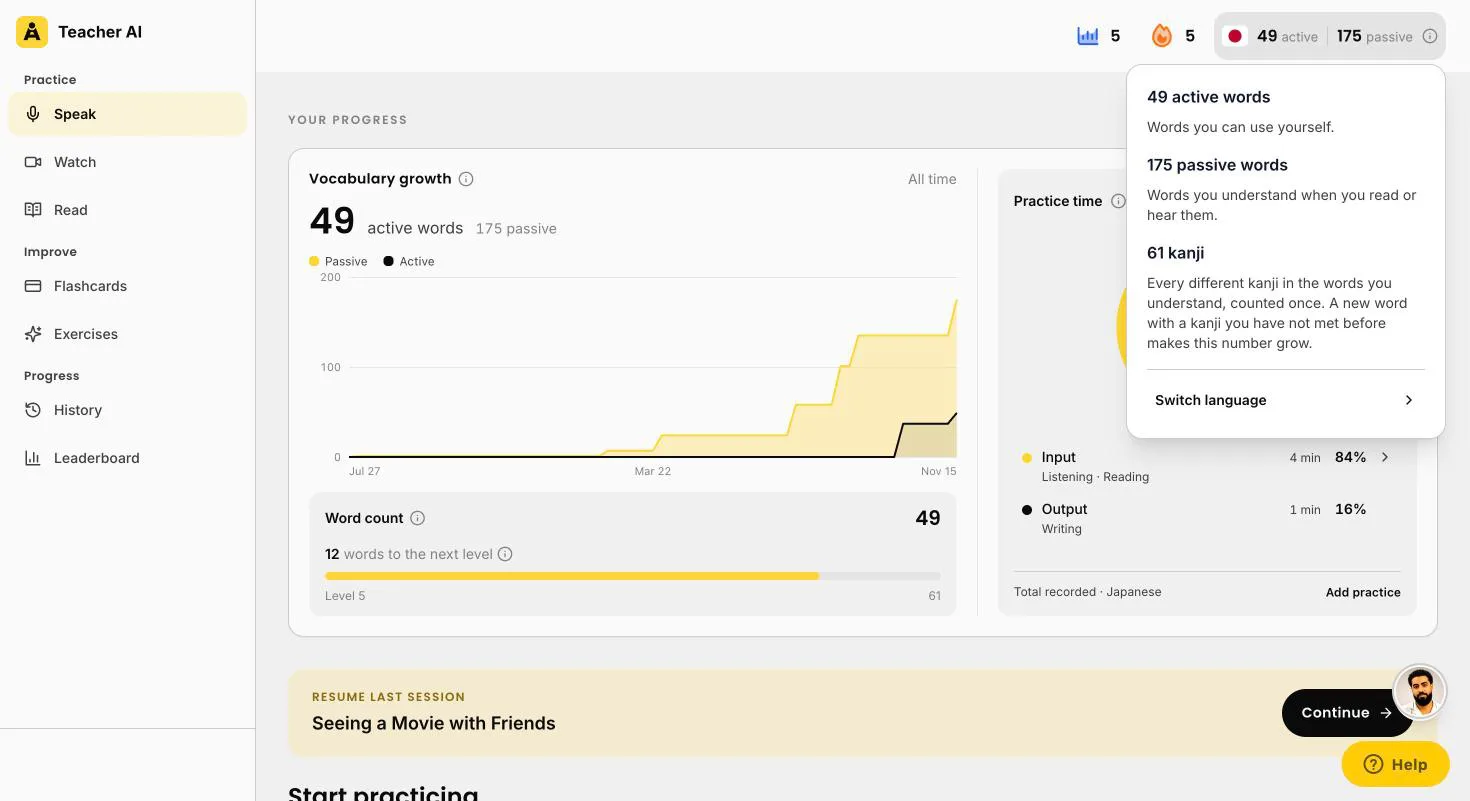
Teacher AI word count in Japanese: 49 active words, 175 passive words and 61 kanji, every different kanji in the words the learner understands
Your kanji, countedTap your word count: 49 active words, 175 passive, and 61 kanji. That’s every different kanji in the words you understand, counted once.

What it looks like in Japanese

Here’s what a moment of practice looks like. Your teacher writes furigana above the kanji, and if you made a mistake, your sentence gets fixed right there.

A card for every word you tap

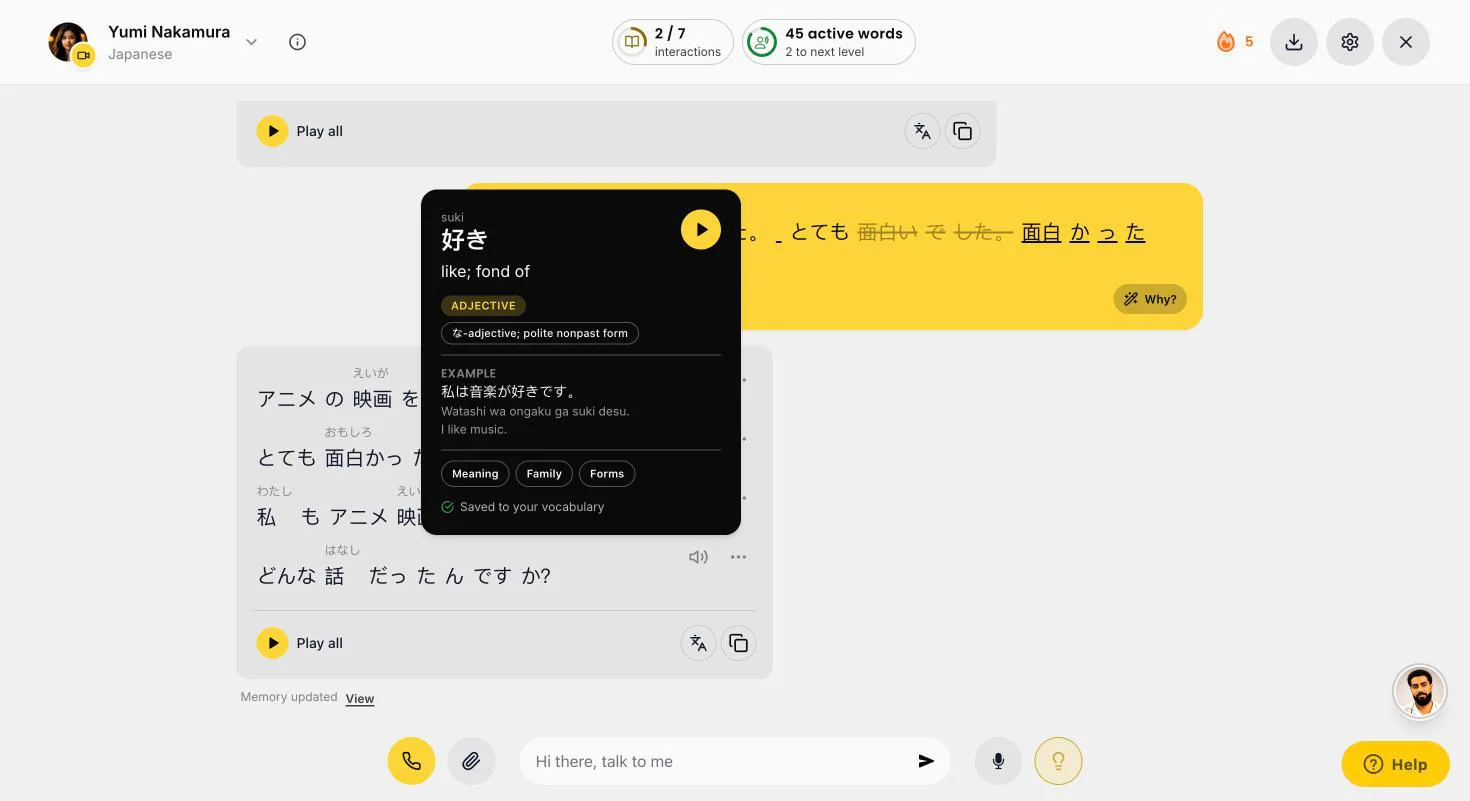
Tap any word, in a conversation, a video or a story, and you get its card: the reading, what it means, what kind of word it is, and an example in Japanese, romaji and English. Tap play to hear it.

好きsuki
to like, fond of
ADJECTIVE
Example私は音楽が好きです (watashi wa ongaku ga suki desu), I like music.
Good to knowThe thing you like takes が, not を. It works more like “music is pleasing to me”.
面白いomoshiroi
interesting, fun
ADJECTIVE
Exampleこの映画は面白い (kono eiga wa omoshiroi), this movie is fun.
Past tense面白かったです (omoshirokatta desu), it was fun. Not 面白いでした: an い-adjective takes the past tense itself.
雨ame
rain
NOUN
Same sounds飴 (ame) is candy. In Tokyo Japanese, rain starts high and drops: A-me. Candy starts low and rises: a-ME.
Good to knowOn the page, the kanji tell them apart. When you talk, only the pitch does.

An illustration of three word cards, rebuilt for this page. On the real card, the wording depends on the word. Below: real screenshots of the web app.

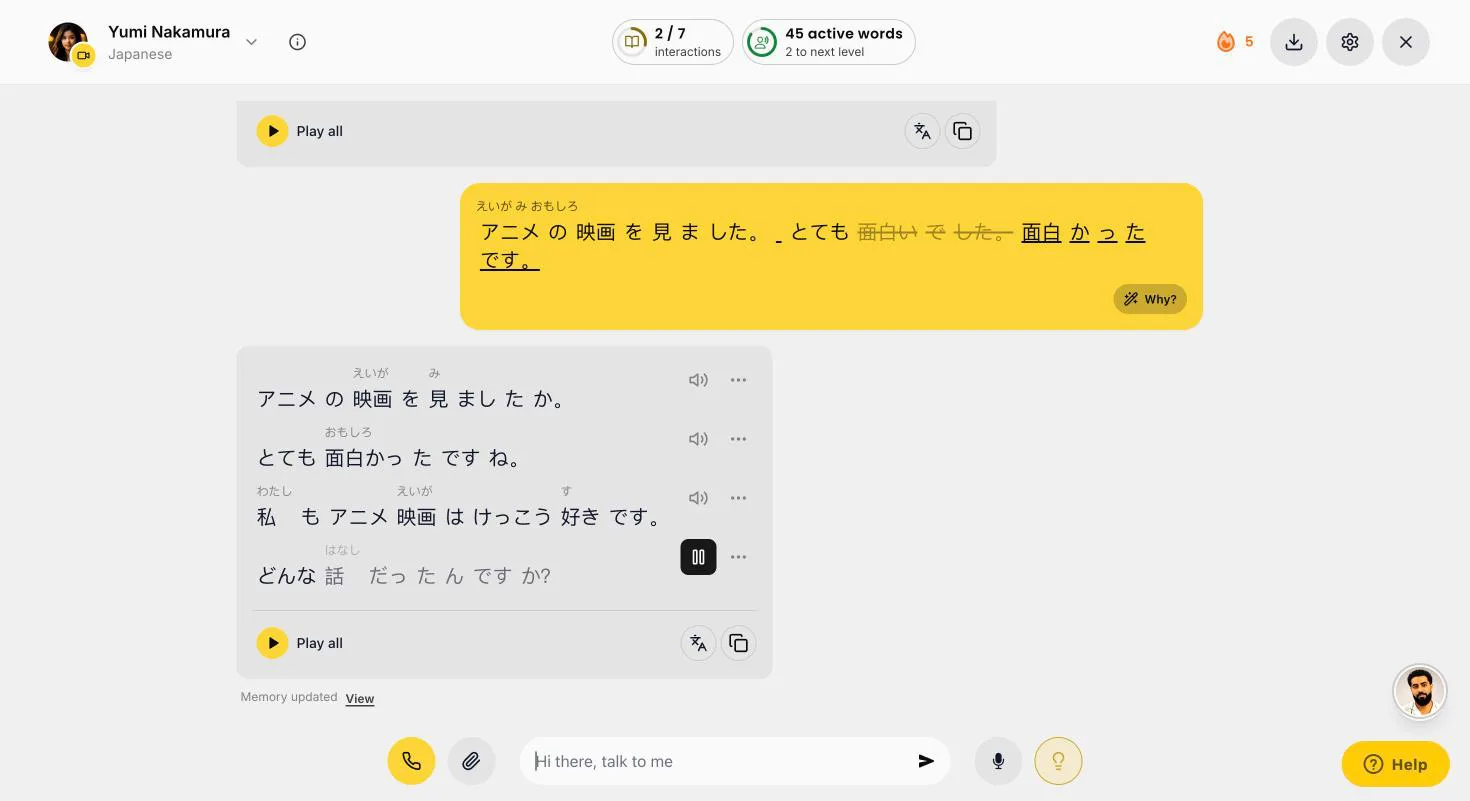
A Japanese conversation on Teacher AI with furigana above the kanji: 面白いでした corrected to 面白かったです, and Yumi replies
Furigana above the kanjiYumi, from Osaka, asks about the movie you saw. You write 面白いでした, and it gets fixed to 面白かったです. Furigana sits above every kanji, in your message too.
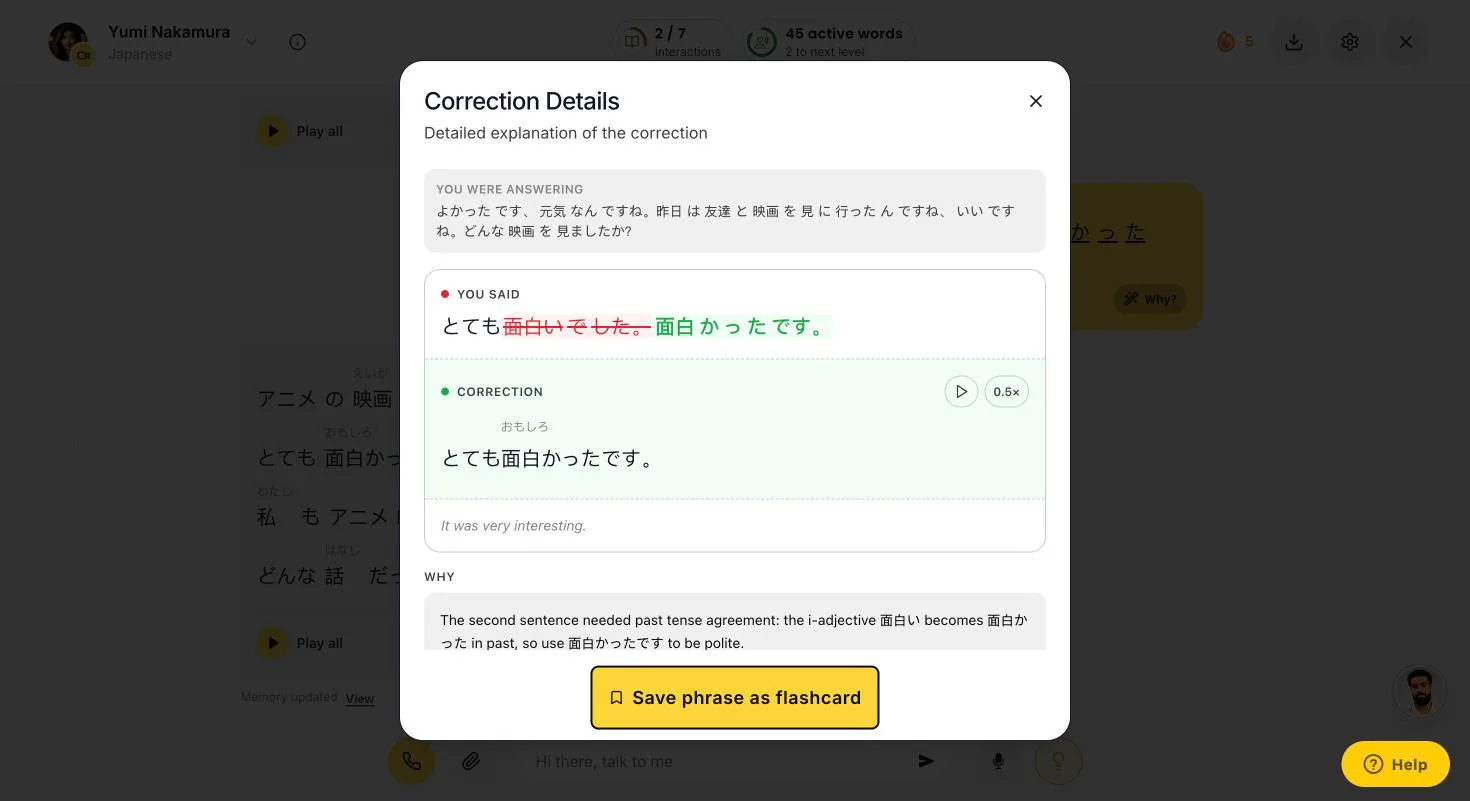
Teacher AI correction details for a Japanese sentence: 面白いでした becomes 面白かったです, with furigana, a translation and why
Tap Why?An い-adjective takes the past tense itself: 面白い becomes 面白かったです. You see the fix with furigana, a translation and why.
Teacher AI word card for 好き, suki: like, a na-adjective, with an example in Japanese, romaji and English
Tap any word好き (suki), to like: a な-adjective, with an example in Japanese, romaji and English.
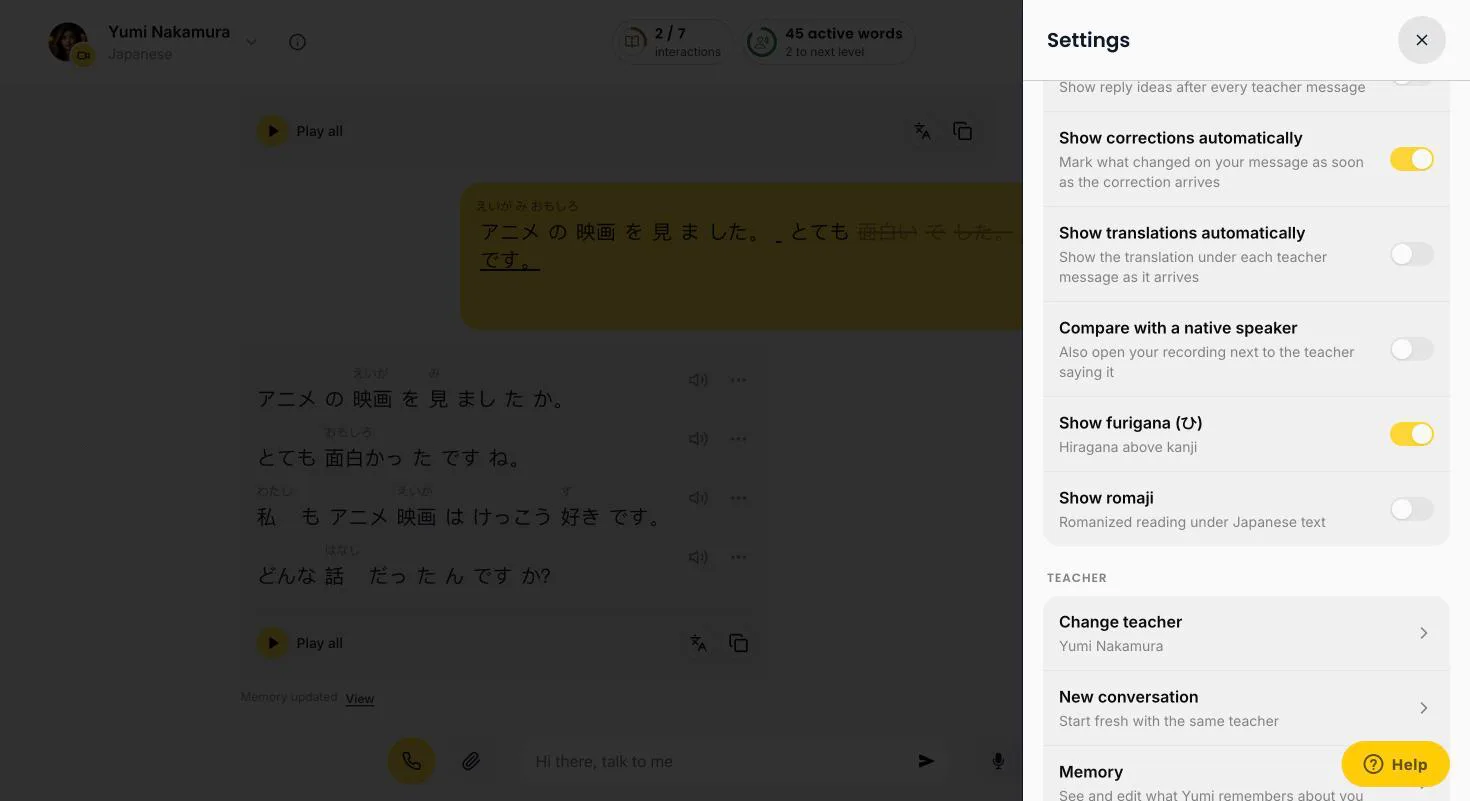
Teacher AI chat settings for Japanese: Show furigana, hiragana above kanji, and Show romaji
Furigana or romajiPick furigana, hiragana above the kanji, or romaji instead. Switch them off once you read on your own.

Meet your Japanese teachers

Five teachers: Aiko from Kyoto, Daichi from Fukuoka, Kenji from Tokyo, Yumi from Osaka, and Xiaoma from New York, the YouTuber behind Xiaomanyc and one of our co-founders. Pick the one you like.

  • Aiko Tanaka
    Aiko Tanaka
    Kyoto · Japanese
  • Daichi Mori
    Daichi Mori
    Fukuoka · Japanese
  • Kenji Sato
    Kenji Sato
    Tokyo · Japanese
  • Xiaoma
    Xiaoma
    New York City · American

    Xiaomanyc
  • Yumi Nakamura
    Yumi Nakamura
    Osaka · Japanese

Input: Japanese to watch and read, at your level

Here’s the input side up close. New words and kanji come from lots of Japanese you hear and read, where you already understand most of it.

Watch and Read are on the web app for now, both with furigana above the kanji. Words you read along with, without tapping, count toward your passive words. Every word you tap lands in your flashcards. And when you’re done, you talk about it with your teacher.

  • Any YouTube videoPaste a link to a Japanese YouTube video, or an Apple Podcasts episode. We turn it into a page you read along with: furigana above the kanji, new words in yellow. No subtitles? On a paid plan we transcribe it for you, within a monthly allowance.
  • Suggested for youWatch suggests Japanese videos by topic, from channels made for learners to podcasts and the news, each with the share of words you’d understand.
  • Stories written for youRead writes Japanese texts at your level, from A1 to Native, about anything you like, and suggests ideas from what you talk about with your teacher. There’s today’s news, too.
  • How much you know, before you startTeacher AI keeps a list of every Japanese word you’ve met: the ones you use when you talk, the ones you read or hear, the ones you tap. Japanese has no spaces, so it cuts the text into words first. Then it checks every word against your list and shows you the share you already know.
  • The 80% rulePick videos and texts where you know 80% or more of the words. Then your brain fills in the rest from context. Under 70% is too much for now. 90% and up is easy and fun.
  • Then talk about itOne tap on Talk about this starts a conversation about what you just watched or read. Retelling it is how new words become words you can say.
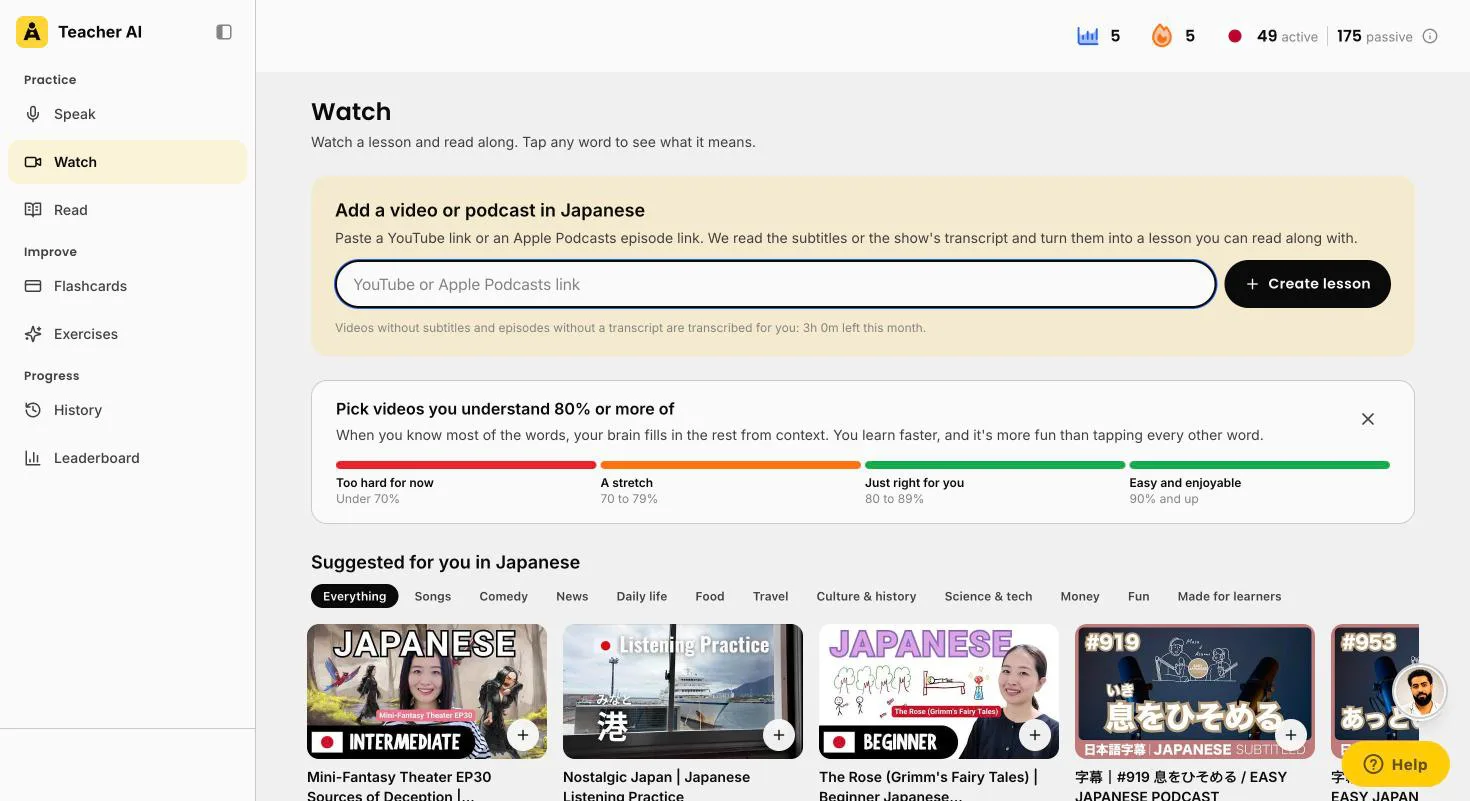
Teacher AI Watch in Japanese: paste a YouTube or Apple Podcasts link, the 80% rule, and videos suggested by topic with the share the learner would understand
Suggested for you in JapanesePaste any YouTube or Apple Podcasts link, or pick a suggestion by topic. Each one shows the share you’d understand. This account knows about 175 Japanese words, so it’s all still too hard. That’s the honest answer.
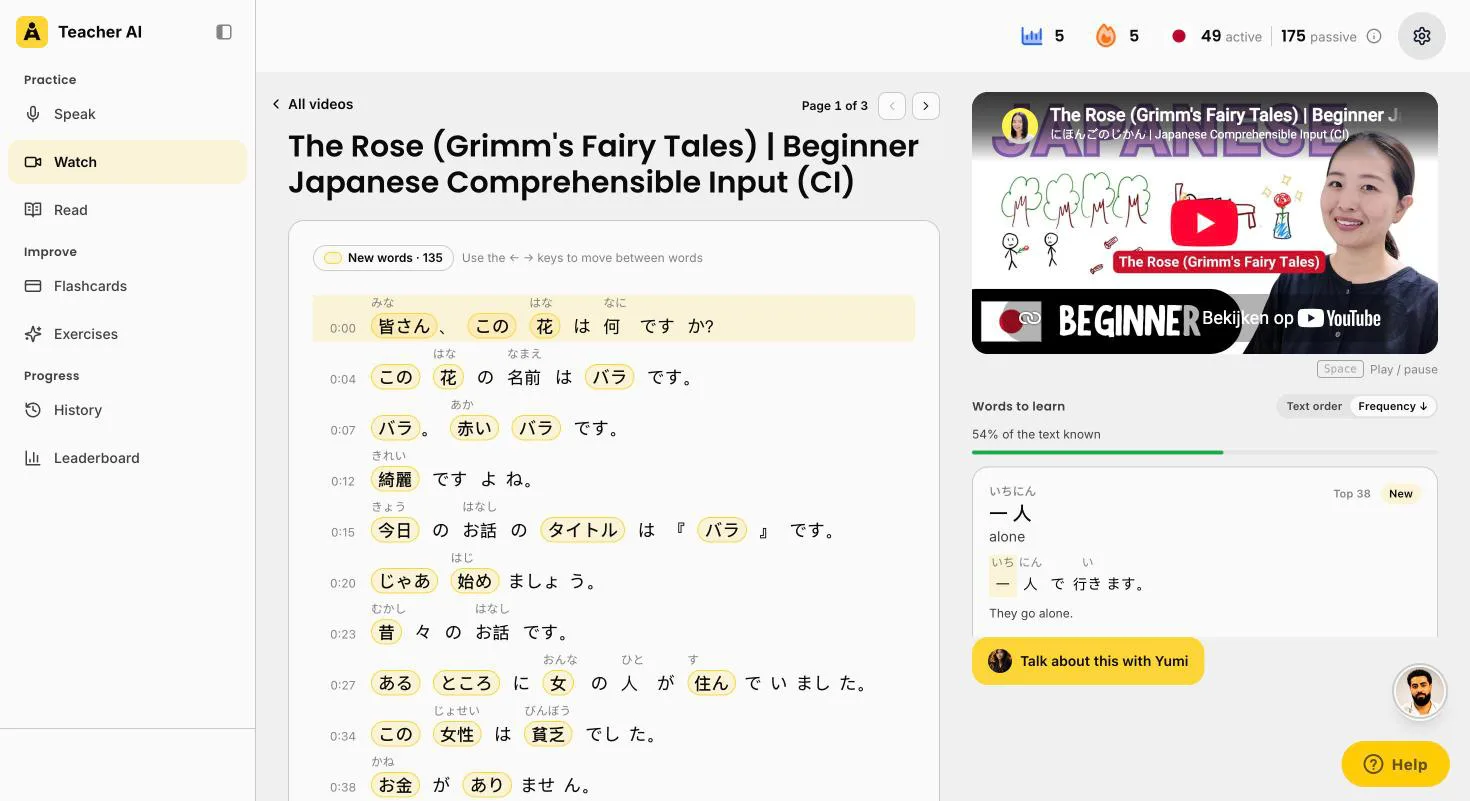
A beginner Japanese YouTube video, The Rose, as a Teacher AI lesson, with furigana above the kanji, new words marked and 54% of the text known
Furigana in videos tooA fairy tale for beginners from にほんごのじかん, as a lesson: furigana above the kanji, new words in yellow, 54% known. Words to learn are sorted by how common they are.
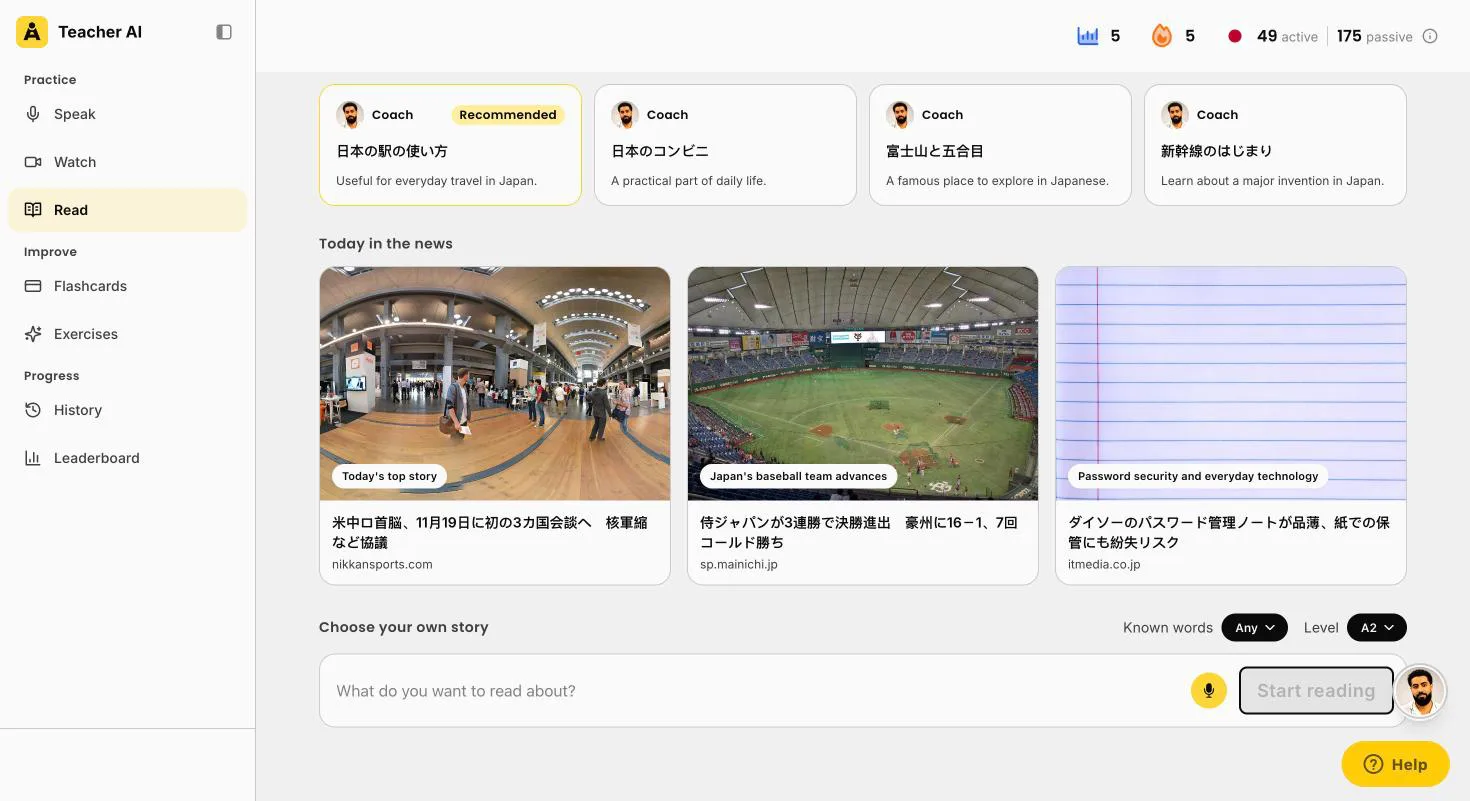
Teacher AI Read in Japanese: reading ideas based on your conversations, and today in the news
Ideas from your conversationsReading ideas from what you’ve talked about: train stations, convenience stores, Mount Fuji, the first Shinkansen. And today’s news, in Japanese.
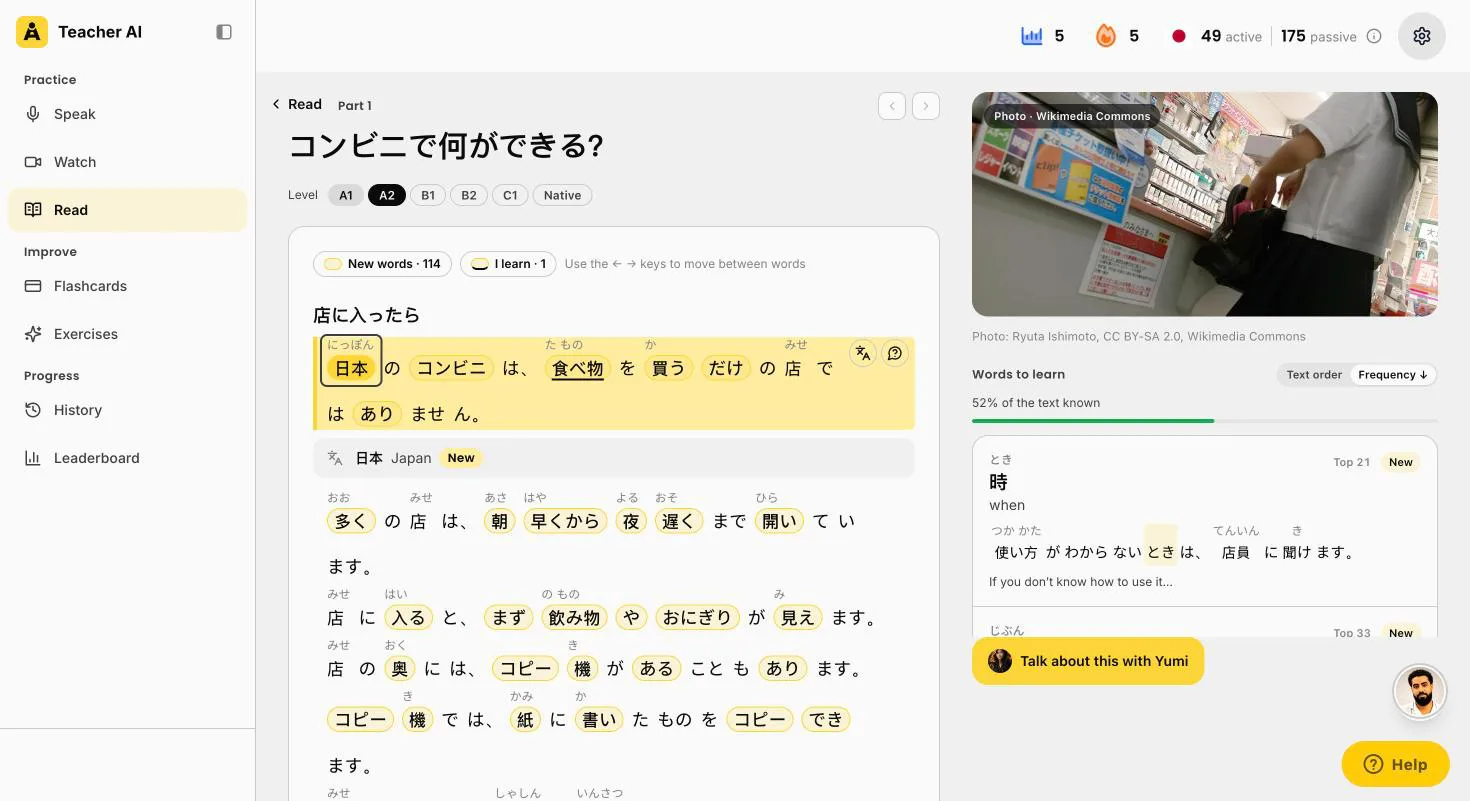
A Japanese story on Teacher AI at A2 about convenience stores, with furigana above the kanji and 52% of the text known
A story at your levelコンビニで何ができる?, what you can do at a konbini, at A2, with furigana and a photo. 52% known is still too much for this learner, so pick A1.

Teacher AI or Duolingo?

Lots of people start Japanese on Duolingo. Good! So here’s how the two compare for speaking, with every Duolingo fact from Duolingo’s own pages.

Duolingo
Teacher AI
What it’s built for
Short lessons and exercises, as a daily game. Up to B2.
Conversation, plus Japanese to watch and read at your level, with every word and every kanji you learn tracked.
Open conversation
Not clear for Japanese. Its blog says Video Call covers Japanese, its help center doesn’t list it. Roleplay isn’t offered for Japanese.
Unlimited on a paid plan, by voice or text, or hands-free in a call.
Kana and kanji
Kana from day one, romaji and hiragana guides you can switch off, a characters tab, and kanji lessons from Section 2.
Furigana above every kanji, or romaji, in conversations, videos and stories. Switch it off any time.
Corrections
Explain My Answer explains your mistakes in exercises, Japanese included, now for free.
During the conversation: your own sentence is fixed, and Why? explains each fix.
Starting from zero
Yes. The course starts at the beginning.
No. For Japanese, Teacher AI works best from about A2.
Where it works
iPhone, Android and web. Video Call and Roleplay only in the app.
iPhone, Android and web, conversations included.
Price (US)
Every course is free, with ads. Super Duolingo: $9.99 to $119.99 on the US App Store.
Start free on the website. Unlimited conversation: $149 a year on the web.

Duolingo is a good free way to learn kana and your first kanji. Teacher AI doesn’t have a step-by-step Japanese course. Once you reach about A2 and want to talk, that’s what Teacher AI is built for.

The apps side by side

FeatureTeacher AILanguaSpeakTalkpalPraktikaDuolingo
Teaches this languageYes, from about A2Yes, one of its 23 languagesYes, for English speakers. Beginner to intermediate, and Speak calls the course beta.YesYes, A0 to C2Yes, from English, up to B2
Open conversationUnlimited on a paid plan, by voice or text, or hands-free in a call. Free plan: one conversation.Free-form chat and Call Mode. Unlimited plan: no limit. Communicate plan: 30 minutes of calls a day.AI tutor lessons and roleplays. Premium: 3 made-for-you lessons a day and a daily cap on tutor lessons. Premium Plus: unlimited.Chat, calls, roleplays and debates. Unlimited on Premium.Free talk, roleplays and a hands-free video-call mode with AI avatars.Not clear: its blog says Video Call covers Japanese, its help center doesn’t list it. Roleplay isn’t offered for Japanese.
CorrectionsDuring the conversation: your message is marked up, and Why? explains each fix.Five correction modes, a tap to explain any correction, a report after the chat.During and after a conversation, with a Retry option.Feedback after each reply, and a tool that explains any sentence.Tips and corrections after each reply.Explain My Answer explains mistakes in exercises, Japanese included (free).
Pronunciation helpReplay your recording next to a native speaker saying the same line. No pitch-accent score.Its pronunciation feedback covers Spanish, French and English, not Japanese.Assesses pronunciation, intonation and fluency. A pitch-accent score isn’t mentioned.Says it checks pronunciation, intonation and rhythm. Its Sentence Mode score is for selected languages, and doesn’t say if Japanese is one.Pronunciation and fluency feedback. A pitch-accent score isn’t mentioned.Speaking exercises and speaking practice sets. No pronunciation score on its pages.
Reading aid for the scriptFurigana above the kanji, or romaji, also in corrections and on word cards and flashcards. Switch it off any time.Furigana and romaji in chat modes, switched on in settings. Not yet in call mode, flashcards or podcasts.Furigana and romaji aren’t mentioned on its own pages.A Romanization feature for non-Latin scripts. Furigana isn’t mentioned.Furigana and romaji aren’t mentioned on its own pages.Kana from day one, romaji and hiragana guides you can switch off, a characters tab and kanji lessons.
Where it worksWeb, iOS and AndroidWeb, iOS and AndroidiOS and Android only. Not on desktop.Web, iOS and AndroidiOS and Android only. No desktop version.iOS, Android and web. Video Call and Roleplay: app only.
Price (US)Web: $149/year, $99/6 months, $25/month. App: $179, $119, $29.Unlimited $199.99/year. Communicate $149.99/year (US App Store).Premium $83.99/year or $17.99/month. Premium Plus $164.99/year (US App Store).$119.99/year or $19.99/month. On the web, $149.99 for 24 months.US App Store: $119.99/year or $9.99/month. New users get 50% off the first plan on its website.Super Duolingo: $9.99 to $119.99 on the US App Store, which doesn’t say which is monthly or yearly.
Free optionStart free on the website, no credit card.3 minutes of calls a day. Trial of 5 or 7 days, card needed.7-day free trial. Free accounts get preview features only.10 minutes a day, free. 14-day trial, no payment up front.Free plan with 3 avatars and limited speaking practice.Every course is free, with ads.

Scroll the table sideways to see every app.

The apps, one by one

Teacher AI

Best for getting fluent: input, speaking and tracking
Speaking
Unlimited on a paid plan. Pick a conversation starter at your level, talk about anything in Free Talk, try a roleplay, or switch to hands-free and just talk.
Furigana or romaji
Furigana above every kanji, or romaji instead, your choice: in the conversation, in corrections, on word cards, conversation starters and flashcards. Switch it off when you’re ready.
Corrections
Your own sentence is fixed while you talk, and Why? explains it: the wrong particle, a past tense, a more natural word.
Progress
Your active and passive words, the number of different kanji in the words you understand, your practice time split into input and output, and 100 levels with the matching CEFR level.
Watch and Read
Turn a Japanese YouTube video or podcast into a lesson (no subtitles? we transcribe it on a paid plan), and read stories at your level, both with furigana. Both show the share of words you already know. On the web app.
Not so good
Not for complete beginners: for Japanese, it works best from about A2. And there’s no pitch-accent score.

Langua

Furigana in chat, on the web too
Speaking
Chat and Call Mode. Unlimited plan: no limits. Communicate plan: 30 minutes of calls a day.
Furigana and romaji
In chat modes, switched on in settings, since December 2025. Its help center says they aren’t in call mode, flashcards or podcasts yet.
Not so good
Its pronunciation feedback covers Spanish, French and English, not Japanese. Unlimited costs $199.99 a year.

Speak

Best guided course on your phone
Course
Japanese for English speakers since June 2025. Speak calls the course beta: beginner content first, then Tutor Lessons for Elementary and Intermediate.
Not stated
Furigana, romaji, and feedback on pitch accent. Its own pages don’t say.
Limits
Only if your native language is English. Phone only. No free plan: a 7-day trial, then $83.99 a year or $17.99 a month.

Talkpal

Open AI chat, on the web too
Speaking
Chat, audio-only Call Mode and roleplays with an AI tutor. Unlimited on Premium, 10 minutes a day for free.
Reading
A Romanization feature for non-Latin scripts. Its pages don’t mention furigana.
Not stated
Whether its pronunciation score (Sentence Mode, “available for selected languages”) covers Japanese.
Price
$119.99 a year or $19.99 a month on the US App Store, with a 14-day trial.

Praktika

Best for video calls with an avatar
Speaking
Japanese from A0 to C2, with lifelike AI tutors, and feedback on pronunciation and grammar after each turn.
Not stated
Furigana or romaji. And its own blog says plainly that Praktika won’t teach you to read kanji.
Platforms
Phone only.

Duolingo

Best free start with kana and kanji
Speaking
Speaking exercises. Its own pages disagree on Video Call for Japanese: the blog says yes, the help center leaves Japanese out. Roleplay isn’t offered for Japanese.
Strengths
Free, with ads. Hiragana and katakana from day one, romaji and hiragana guides you can switch off, a characters tab, and kanji lessons from Section 2. Explain My Answer covers Japanese, for free. Up to B2.
Not so good
Open conversation in Japanese is unclear, and paid and app only where it exists. No pronunciation score on its pages.

Where another app might suit you better

Want a structured audio course? Pimsleur has five Japanese levels, and teaches hiragana, katakana and selected kanji along the way. Its AI Conversation Coach came to Japanese in November 2026: guided conversations with feedback on grammar and pronunciation, on the All Access plan ($20.99 a month on the US App Store).

Studying for the JLPT? Bunpo teaches grammar for every level from N5 to N1. Its paid Platinum plan adds an AI Video Call and roleplay, in the apps only. Its pages don’t show prices.

Want kanji you can switch on and off in a course? LingoDeer lets you show or hide romaji and kanji in its lessons, and has kanji writing drills. You record yourself and compare with a native speaker, but there’s no AI conversation.

Memrise lists “75+ AI conversations” on its Japanese course page, at $61.99 a year on the US App Store. Its pages don’t say whether they correct you.

Busuu teaches Japanese from A1 to B2, but its AI Conversations don’t cover Japanese. And Babbel doesn’t teach Japanese at all.

Want a pitch-accent score? None of the big apps says it has one. On Teacher AI, you hear your recording next to a native speaker saying the same line.

Try Teacher AI for free →No credit card needed

Questions people ask

What’s the best app to practice speaking Japanese?

For getting fluent, Teacher AI: talk about anything for as long as you like, with furigana above the kanji (or romaji) and a Why? on every correction. Plus Japanese videos and stories at your level, and your words and kanji tracked. For a free start with kana and kanji, Duolingo. For a guided course on your phone, Speak.

Which apps show furigana?

Teacher AI shows furigana above the kanji, or romaji if you prefer: in the conversation, in corrections, on word cards and on flashcards. Langua has furigana and romaji in its chat modes, not yet in calls. Duolingo has romaji and hiragana guides in its lessons, and you can switch them off. Speak and Praktika don’t mention furigana on their own pages, and Talkpal only mentions a romanization option.

Furigana or romaji: which should I use?

Learn hiragana and katakana first. It takes a few weeks, and everything gets easier after that. Then use furigana, not romaji: you see the real kanji with the reading above it, so you learn to read while you talk. Romaji is fine for your very first weeks. On Teacher AI you pick one in the settings, and switch it off when you’re ready.

Is there an app that scores my pitch accent?

We didn’t find a big app that says so on its own pages. Speak and Talkpal say they give feedback on intonation, but don’t mention pitch accent as a score. On Teacher AI, you hear your recording next to a native speaker saying the same line.

Does Teacher AI count kanji?

Yes. Next to your active and passive words, it counts every different kanji in the words you understand, once each. A new word with a kanji you haven’t met before makes the number grow.

Can a complete beginner use Teacher AI for Japanese?

Not really. For Japanese, Teacher AI works best from about A2, once you can handle simple everyday sentences. Before that, you just don’t have enough words yet for open conversation. Starting from zero? Learn kana and the basics with Duolingo, Speak or Pimsleur first, then come here to talk. (Spanish and French are different: they have a beginner track from zero.)

Is Teacher AI only for speaking?

No. It’s a complete fluency system. Speaking is how you activate your Japanese. On the web app you also grow it: turn a Japanese YouTube video or podcast into a lesson, and read stories at your level, with furigana above the kanji. And Teacher AI tracks the words you understand, the words you use and your kanji, so you see your progress in real numbers.

Is Teacher AI better than Duolingo for speaking Japanese?

For speaking, yes. Teacher AI is built around conversation, unlimited on a paid plan, on the web and on your phone. Duolingo is built around lessons and exercises, and its own pages disagree on whether Video Call covers Japanese. For a free start with kana and kanji, Duolingo is a good place to begin.

Sources, checked November 15, 2026

Head-to-head comparisons

Teacher AI vs Langua · Teacher AI vs Speak · Teacher AI vs Talkpal · Teacher AI vs Praktika · Teacher AI vs Duolingo. All comparisons.

Other languages

SpanishSpain and Latin AmericaFrenchFrance, Belgium and SwitzerlandMandarin ChineseSimplified or Traditional, with pinyinCantoneseHong Kong, with JyutpingThaiWith spaces between words, and Paiboon+ or IPADutchThe Netherlands and Flanders, with Flemish voicesBrazilian PortugueseWith Brazilian teachers and well-known polyglotsItalianWith Italian teachers from Podcast Italiano and Vaporetto ItalianoGermanWith German and Austrian teachers, from Lingster Academy to Herr AntrimEuropean PortugueseWith teachers from Lisbon, Porto, Coimbra and Faro, and Portuguese With LeoEnglishWith American and British teachers, from Espresso English to English Like A NativeKoreanWith teachers from Seoul and Busan, and every dropped 요 fixedRussianWith the stress marked above every wordTurkishWith Can from Turkishle, and every ending fixed as you talkArabicWith teachers from Cairo, Amman and Jeddah, and a straight answer on MSA or dialectPolishWith teachers from Warsaw, and every case ending fixedSwedishPitch accent, en or ett, and nobody switching to EnglishIndonesianWith teachers from Bali and Bandung, for the Indonesian people actually speakHindiWith teachers from Delhi, Jaipur and Mumbai, and every missing ने fixedRomanianWith teachers from Bucharest and Transylvania, and every ending explainedCatalanFor when Barcelona keeps answering you in SpanishVietnameseWith teachers from Hanoi and Sapa, and every tone, classifier and pronoun fixedUkrainianWith two teachers from Lviv, and every case fixed as you talkGreekWith teachers from Crete and Thessaloniki, and every gender and ending explainedHebrewFor Hebrew without the vowels, with two teachers from Tel AvivCzechWith Klara and Lukáš from Brno, and a Why? on every case ending


The best way to find out is to talk

Pick a teacher and have a real conversation in Japanese. Then decide.

No credit card needed

Available oniPhone and iPadAndroidWeb app