Real speaking practice, built on your curriculum.

Teacher AI gives your students a conversation partner that practices what you actually teach, in your voice or your teachers' voices, for all the hours you are not in the room. How it works depends on your setup, so start here.

Which one are you?

For creators and course owners

Launch interactive programs with unlimited speaking practice.

Turn the course you already sell into a program your students actually speak in. They practice with an AI clone of you inside every lesson and in the Teacher AI app, on your material, as much as they want.

In your voice, on your material · Works on Teachable, Circle, Thinkific & more
For language schools and universities

More speaking practice. Without more teacher hours.

Your students practice speaking between lessons, in your teachers' voices, on your own curriculum. You see every minute of it.

Your curriculum, your teachers' voices · Web, iOS and Android · Optional white-label app
Two ways to work with us

Start with a widget, or get the whole platform

Option 1 · Speaking widgets

Add a speaking widget to every lesson

Each widget is a short spoken conversation that practices exactly what that lesson teaches. Add one per lesson, or as many as you want. Each one goes in with a single iframe, the same few lines of HTML you already use for a YouTube video. The one below is real. Tap it and speak.

Live demo: tap it and speak

An English speaking exercise. You can add this one to your course as it is, and you write your own prompts and exercises too, one per module, in your own voice.

<iframe
  src="https://app.yourteacher.ai/chat-guest/6f3c13b1-38db-4b17-8b30-b7c2b6e7f2f4"
  width="100%"
  height="600"
  allow="microphone; autoplay; fullscreen; clipboard-write"
  allowfullscreen
  style="border: none; border-radius: 4px;"
></iframe>

Paste that into any lesson in Teachable, Circle, Thinkific, Kajabi or anything else that takes an HTML embed. We send you one snippet per module.

Students start speaking right away, with no login and without leaving your course. When one wants to keep going, they subscribe through you and you earn a commission on it.

Apply for a studio →
Option 2 · Your own platform

Get your own white-label app in 10 minutes

Boost your students' learning experience with a platform under your own brand. Turn your videos into lead magnets, manage your AI clone, and see exactly how every student is doing.

Turn your YouTube videos into lead magnets

Paste a YouTube link and get an interactive lesson in one click. Viewers tap words, repeat sentences and speak with your AI clone. To keep going they leave their email, so every video you already made starts collecting leads.

Your AI clone, managed by you

Same voice, same style, same way of explaining things. Update its bio, its languages and its voice whenever you want, so your students always recognize you.

Student management

Every student in one place: who is active, how many words they have spoken, their streak and when they last practiced. Add students, import a cohort, grant or revoke access.

Learning statistics

Minutes spoken, learner turns, words activated, lessons completed. See what is working, who is falling behind and where students get stuck.

Illustrations of the platform. The totals are from a demo account.

App builder

Create your own app in 10 minutes

In your studio you build the app your students open: your name, your colors, your AI clone, the features you want. Publish, and it is live at your own address, with your students practicing inside your brand.

  • Your name, logo, colors and domain
  • Your AI clone as the teacher, in your voice
  • Switch features on or off: role-play, hands-free, flashcards, Watch, Read
  • Add your own pages, then publish in one click
Book a platform demo →

Want it in the App Store and Google Play under your own name too? We build that with you.

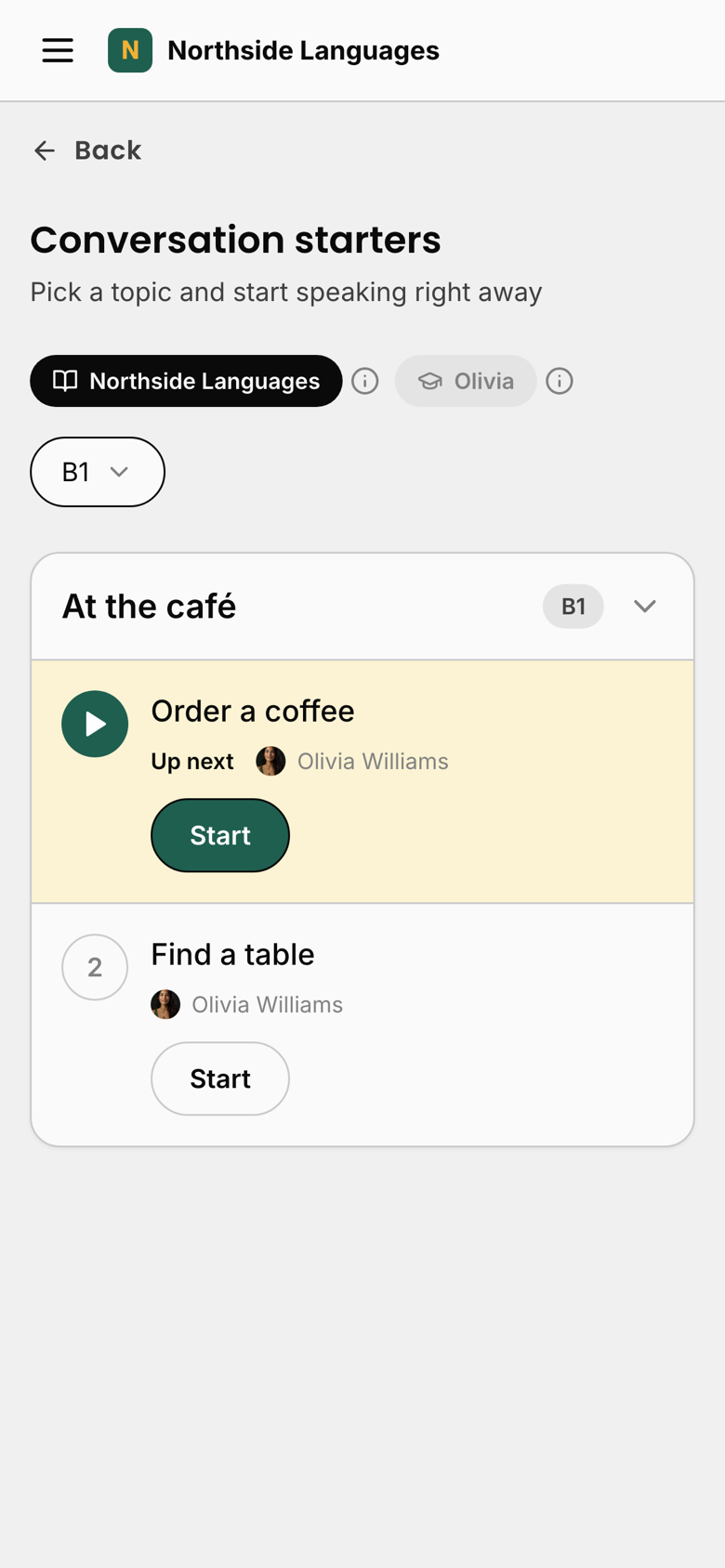
A white-label app: conversation starters under the creator's own name
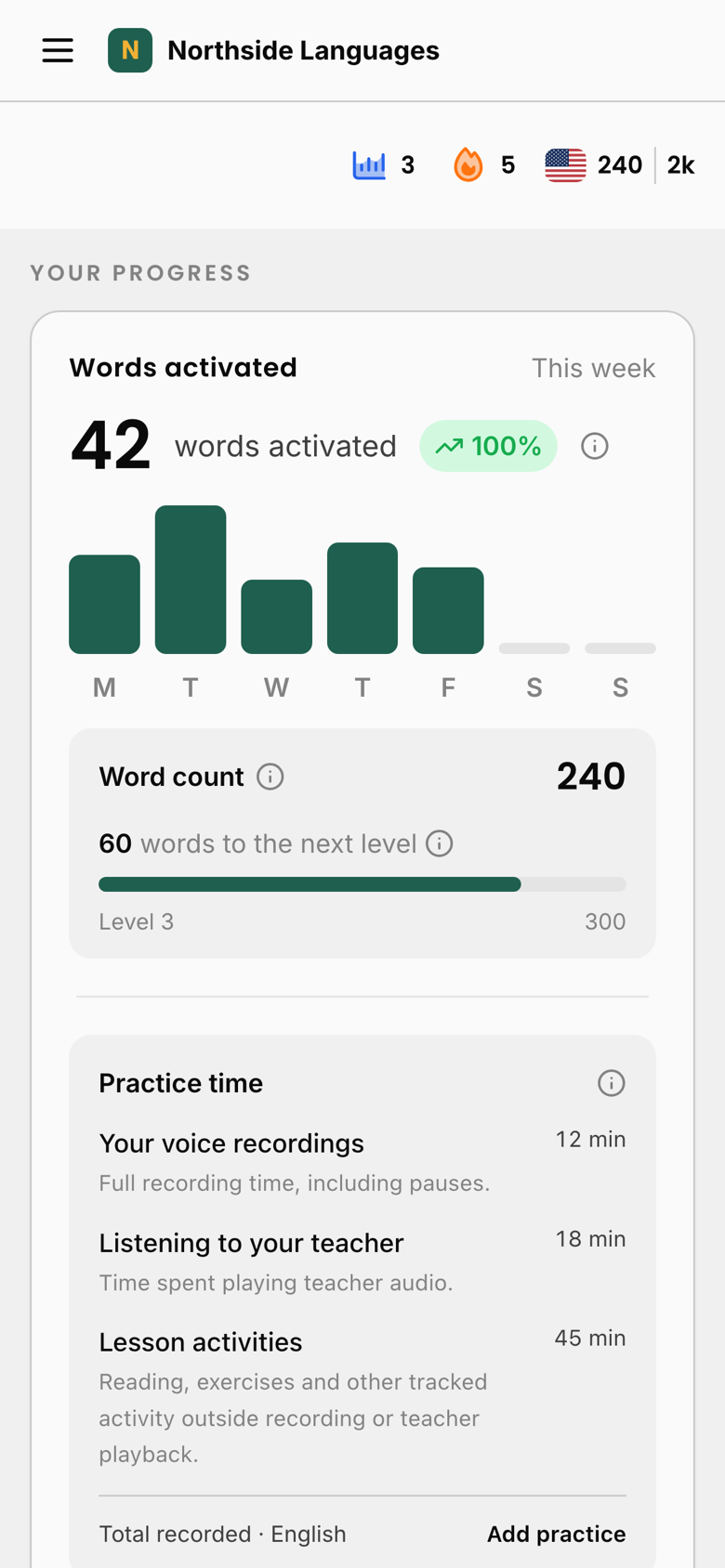
A white-label app in its own colors: words activated this week, word count and practice time
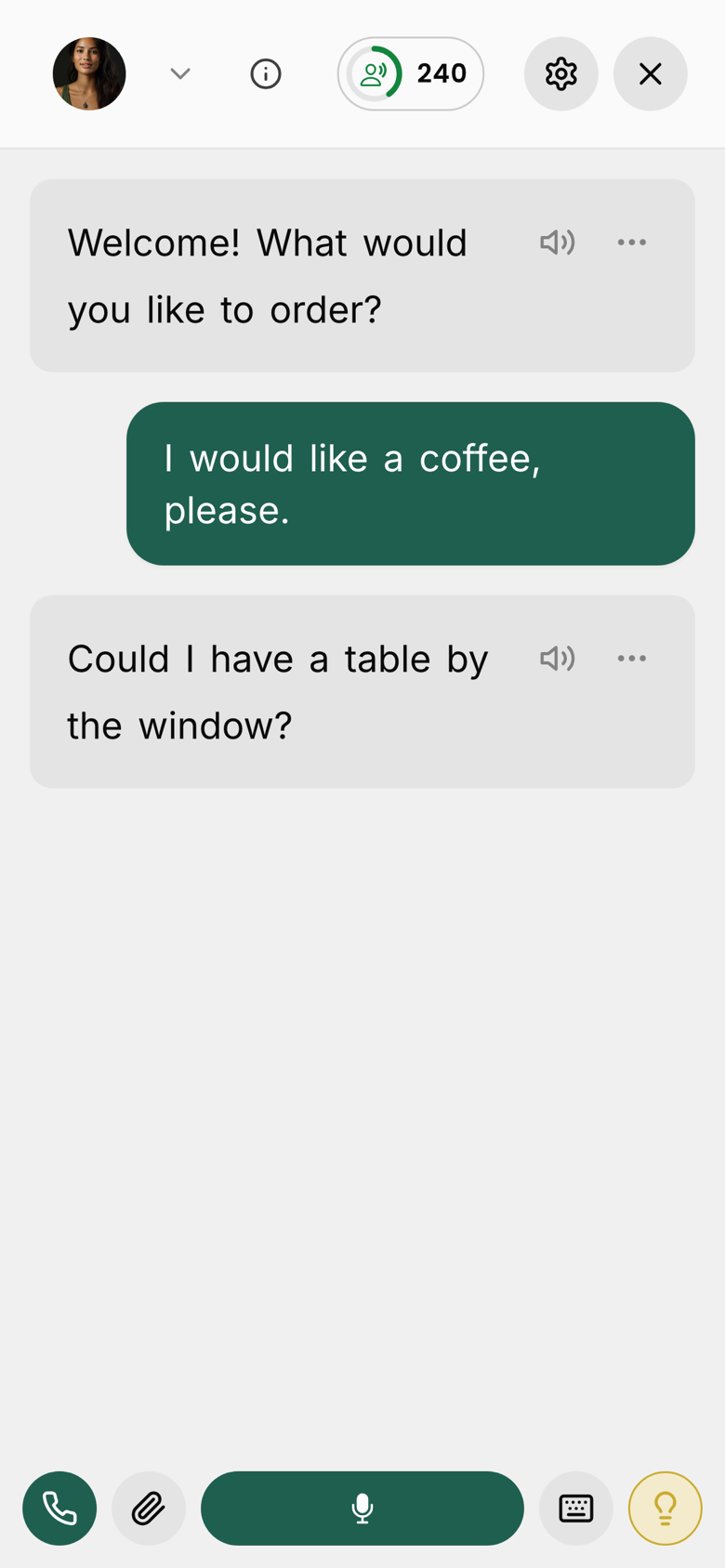
A student speaking with the AI teacher inside the white-label app

A sample app, built in the App builder.

Already on board

Creators using this today

How it works

The practice happens
between your lessons.

You keep teaching the way you teach. We take your material and turn each unit into a spoken exercise your students can do on their own, as many times as they want, in the voice of the teacher who taught it.

1

Upload your own curriculum

Add your units and lessons in your own dashboard, organized by course, level and language. Speaking exercises are built around them, and you generate the embed codes yourself whenever you need one.

2

Students practice on their own

They open it in a browser, or in your own app, and speak. Corrections come back in the moment, the way a good teacher gives them.

3

You see who is putting in the hours

A student overview shows who practiced, how much language they produced and how engaged they are, per class and per period. Work outside the classroom finally becomes measurable.

What your students see

A speaking partner at any hour.

This is a real exercise, not a video. Tap it, allow the microphone and speak. Your students get the same thing on your curriculum, in your teachers' voices, in the browser or in the app.

Live demo: tap it and speak

An English exercise anyone can try. On a school plan your students are signed in, so there is no limit on practice and no sign-up prompt at the end.

What you see

Every hour of practice, on your dashboard.

The moment a student speaks, it shows up in your school portal: how much your school practiced, which lessons get used, and which students have gone quiet.

Your whole school

Practice time, sessions and learner turns for the last week, month, quarter or year, with a day-by-day chart.

Every lesson

See which lessons and teachers your students actually practice with, and which ones nobody opens.

Every student

Minutes spoken, streak and active vocabulary per student. Spot who went quiet, extend or end their access in two clicks.

Getting started

We set it up with you.

Every school gets a person on our side. We set up your teachers, your lessons and your app together, and we stay with you until your team knows how it works, your school is up and running and your students are happy. Nothing to figure out on your own.

Your studio

Your teachers. Your lessons.
Your app.

Your whole school runs from your studio: your teachers, every exercise, your students and your own app. And you never set it up alone. We do it with you.

Teachers

Your teachers. Their voices.

Add every teacher who teaches at your school and we clone their voice. A student practicing unit 4 hears the teacher who taught unit 4, in the language they teach, with the same manner they use in class.

  • One cloned voice per teacher, in your own account
  • Assign a teacher to any unit or lesson
  • Add or remove a teacher at any time
  • A few minutes of sample audio is all we need
Lessons and units

Upload and own your lessons

Upload your own lessons and units, organize them by course, level, and language, and assign a teacher to each one. Your curriculum stays yours.

  • Upload your own lessons and units
  • Organize by course, level, and language
  • Assign a teacher to every lesson
  • Your content, owned by you
App builder

Customize and launch your own app in 5 minutes.

In your studio you build the app your students open: your name, your colors, your teachers, the features you want. Publish, and it is live at your own address.

  • Your name, logo and colors
  • Pick the teachers for each language you teach
  • Switch features on or off: role-play, hands-free, flashcards, Watch, Read
  • Add your own pages, then publish in one click
Book a platform demo →

Want it in the App Store and Google Play under your own name too? We build that with you.

A school's own app: conversation starters under the school's name
A school's own app in its own colors: words activated this week, word count and practice time
A student speaking with their AI teacher inside the school's own app

A sample school's app, Northside Languages, built in the App builder.

Pricing

From $15 per student, per month.

The rate depends on your size. It starts at $15 per student per month from 100 students, and comes down at 500 students and again at 1,000. No setup fee, no annual contract to sign before you have seen it work, and teacher accounts are unlimited and included. We work out your exact number on the call.

100 students
From $15
per student, per month
500 students
Volume rate
the price comes down
1,000+ students
Best rate
our lowest per-student price

Setup is included. Send us your curriculum and we build the speaking exercises around it.

Questions?

Creator FAQ

Schools and universities FAQ

How does Teacher AI know what to teach in each lesson?

You upload your course materials, and the speaking exercises are generated from your content, one per module, matched to what you're teaching. No prompt-writing on your part, no AI training to wrangle. We handle the setup end to end.

How does it know what to practice?

Two ways, and most schools use both. In your studio you create speaking exercises from your own curriculum: your units, your lessons, your levels, so a student practices exactly what their teacher just covered. We help you set them up.

No curriculum ready yet? You do not have to wait for one. Teacher AI comes with built-in exercises that are ready to use from day one: role-plays, conversation starters and courses across levels and languages.

How much can each student use it, per module?

On the free embed, one full speaking exercise per module. A real practice session on the topic of that module. (Technically up to 7 conversational turns, which is enough to actually use what you just taught.) Students who want to keep going can sign up for unlimited access, or you can license unlimited access for everyone.

How much can each student use it?

As much as they want. Every student on your plan gets unlimited speaking practice, on every exercise, at any hour.

What if my students are already Teacher AI subscribers?

They can log in during the embedded session and the per-module guest cap disappears, so they get unlimited speaking practice on your course content. Existing subscribers get the best of both worlds: your structured course plus unlimited conversation.

How does the pricing work? Do we pay you?

On the free plan, the integration costs you nothing and the embeds stay free. We earn from the students who choose to sign up for unlimited Teacher AI access after their free per-module exercise, and you earn affiliate commission on every one of them, so the free plan can pay you rather than cost you.

On the license, you pay $15 per student, per month. In exchange your students get unlimited use, never see an upsell prompt, and you get the dashboard, your own uploaded lessons and analytics. If you have a lot of students, get in touch and we'll work it out together.

Are you going to sell to our students?

Fair question, and worth being straight about. On the free plan, a student who finishes their exercise and wants to keep talking sees a soft prompt to sign up for unlimited Teacher AI. It appears once the exercise has wrapped up, never mid-lesson, and it is never a paywall on the practice you're giving them.

Two things make that work in your favour rather than against you. First, you earn affiliate commission on every student who signs up through your embeds, so those signups pay you. Second, they're buying general speaking practice, not a replacement for your course, and they stay in your course either way.

If you'd still rather they never saw it, that is exactly what the paid plan removes. Every enrolled student gets unlimited practice and zero upsell prompts, end to end.

Does this replace our teachers?

No, and it isn't built to. The AI is a practice partner for the hours your teachers aren't there: the repetition, the drilling, the low-stakes speaking a learner needs far more of than any timetable can hold. It practices your curriculum, in your teachers' voices, on what you already taught.

The point is to change what class time is for. When students arrive having already used the material out loud, your teachers can spend less of the lesson on mechanical repetition and more on the things only a person can do.

Do students need an account, or an app?

An account, yes. You create it for them: add students one by one or import a whole class by CSV from your studio, and they get their login. Their progress is saved and you see their practice.

An app, no download needed. Your school gets its own responsive web app that works in any browser, on a laptop, a Chromebook or a phone. Students can save it to their phone's home screen and open it like an app.

Can we manage our own students, access, and lessons?

Yes, on a paid plan. You get a full dashboard where you add students or import a whole cohort by CSV, grant or revoke access at any time, and upload and organize your own lessons and units. You also get a live analytics view: words activated, active students, engagement, and session time.

Can we manage our own students, access, and lessons?

Yes, of course. In your studio you add students one by one or by CSV, change when their access ends or remove them, and upload and organize your own lessons and units. You also see who practiced, how much, and who has gone quiet.

Can we get our own white-label app and platform?

Yes. On a custom plan we can deliver a fully white-label app and platform under your own brand, logo, and domain. Your students practice inside your brand and never see Teacher AI. Get in touch and we'll scope it with you.

Can we get our own white-label app?

Yes, and by default you already have one. Every school gets its own web app under its own name, logo and colors, at its own address, built in the App builder. It is responsive, so students can save it to their phone's home screen and use it like any other app.

If you want an official app of your own in the App Store and Google Play, we can build that too. A store app needs more upkeep (store reviews, releases and updates), so it comes with a setup fee or a longer-term commitment. We will scope it with you on a call.

Is there a login at all? Will students get redirected away from my course?

Not on the free embed. Students click into the iframe and start speaking immediately as a guest, no login and no redirect. If they want more practice beyond their free per-module exercise, they see a soft prompt to sign up for unlimited access. They are never forced to leave your course.

What platforms do you support?

Anything that accepts an iframe embed: Teachable, Circle, Thinkific, Kajabi, Hotmart, Mighty Networks, Podia, LearnWorlds, and custom-built course sites. If you're not sure, send us a link and we'll confirm.

How long does setup take?

Once you apply and give us access to your material, most setups land within 5–7 business days. The time depends mostly on how many units need custom exercises.

How long does setup take?

The first version of your school can be up and running in five minutes. Every school with a studio gets the App builder: pick your name, colors, teachers and features, publish, and your app is live. From there we help you add your own lessons, your teachers' voices and your students.

Can my students practice with my voice?

Yes. That's the standard setup. We clone your voice and teaching style so students practice with you, in your voice. If your course has multiple teachers, we clone each one. All we need is a few minutes of sample audio of each teacher speaking the target language (a clip from your YouTube channel, a recording, anything you can send).

Can students practice with our own teachers' voices?

Yes, and it is the setup we recommend. We clone each of your teachers so a student hears someone they recognize from class. All we need is a few minutes of sample audio per teacher speaking the target language. Teachers give consent before we clone them, and we remove a clone whenever you ask.

What about data privacy?

All voice and conversation data is handled under our Privacy Policy. We don't sell student data and we never share it with third parties beyond the service providers needed to make speech-to-text work.

Who controls our students' data?

You do. We sign the data processing agreement and the EU standard contractual clauses. Your school stays the controller, we process on your instructions, and it is all on paper before the first student account exists.

  • A data processing agreement, signed at the start.
  • EU standard contractual clauses for the transfer.
  • A written list of every provider that touches student data.
  • Students keep their GDPR rights: access, export and deletion.

Everything else is covered by our Privacy Policy. Bring your data protection officer to the call and we will walk them through what is stored, where, and for how long.

What languages do you support?

60+ languages: Italian, French, Spanish, German, Mandarin, Portuguese, Russian, Dutch, Norwegian, Turkish, and dozens more. Full list available on the main page.
Get your students speaking

Start with speaking widgets in your lessons, or book a demo of your own white-label platform. Either way we set you up with your clone and your first lesson.

Want this for your school?

Book a short call. Tell us what you teach and how many students you have, and we'll show you exactly what it would look like on your own curriculum.

Book a call →